

LawAgent in action
A day with LawAgent.
Screen by screen, the real journey of someone using the platform — from the first dashboard of the day to the reviewed, approved deliverable.
First step
My Work
The day starts in “My Work” — the single dashboard that brings together deadlines, client requests, pending tasks, and everything awaiting your approval. No new tabs to open, no systems to hunt through.
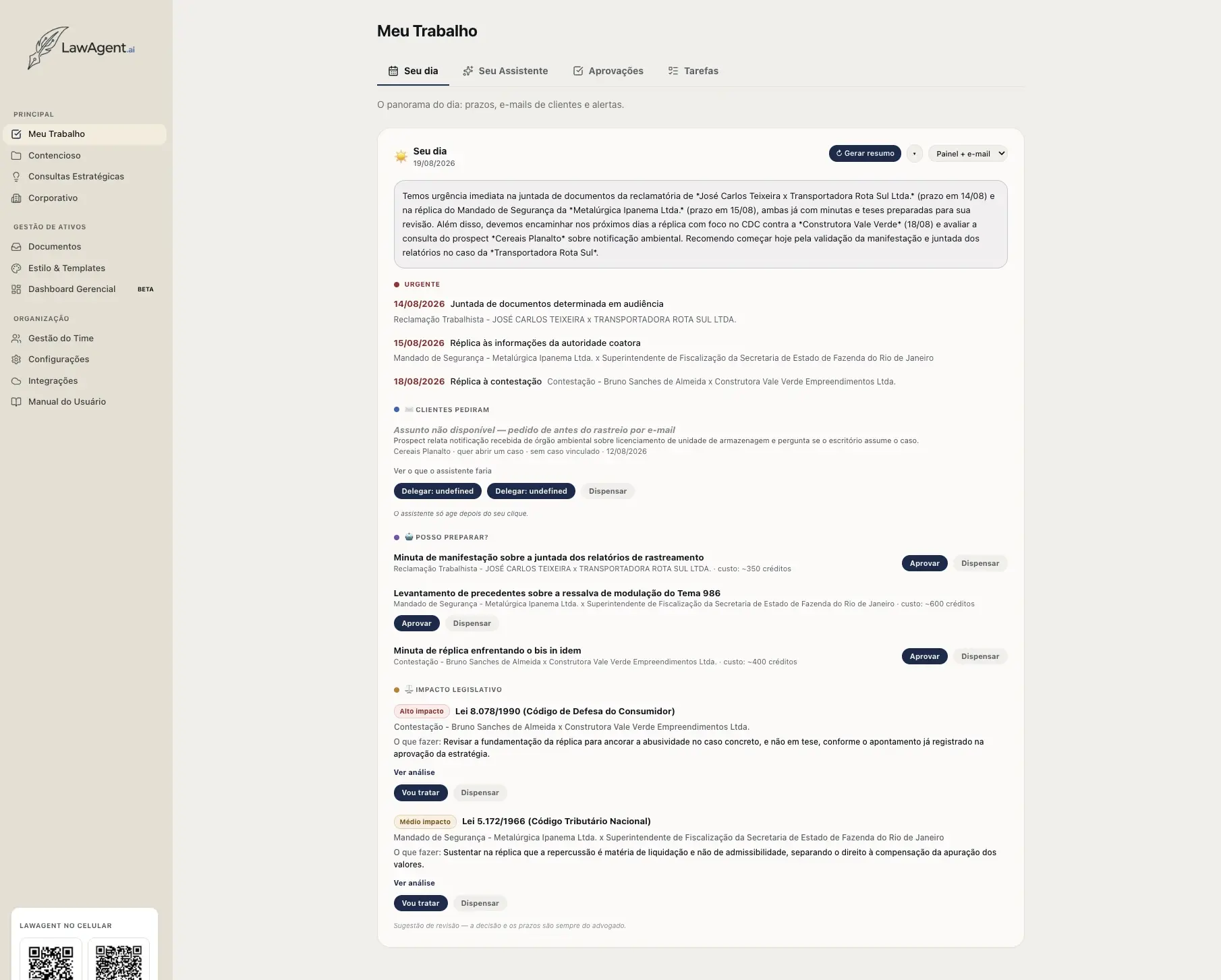
Your Day
Urgent deadlines, client requests by email, drafts the AI has already prepared, and law changes affecting a case — all in one summary, with what to do next.
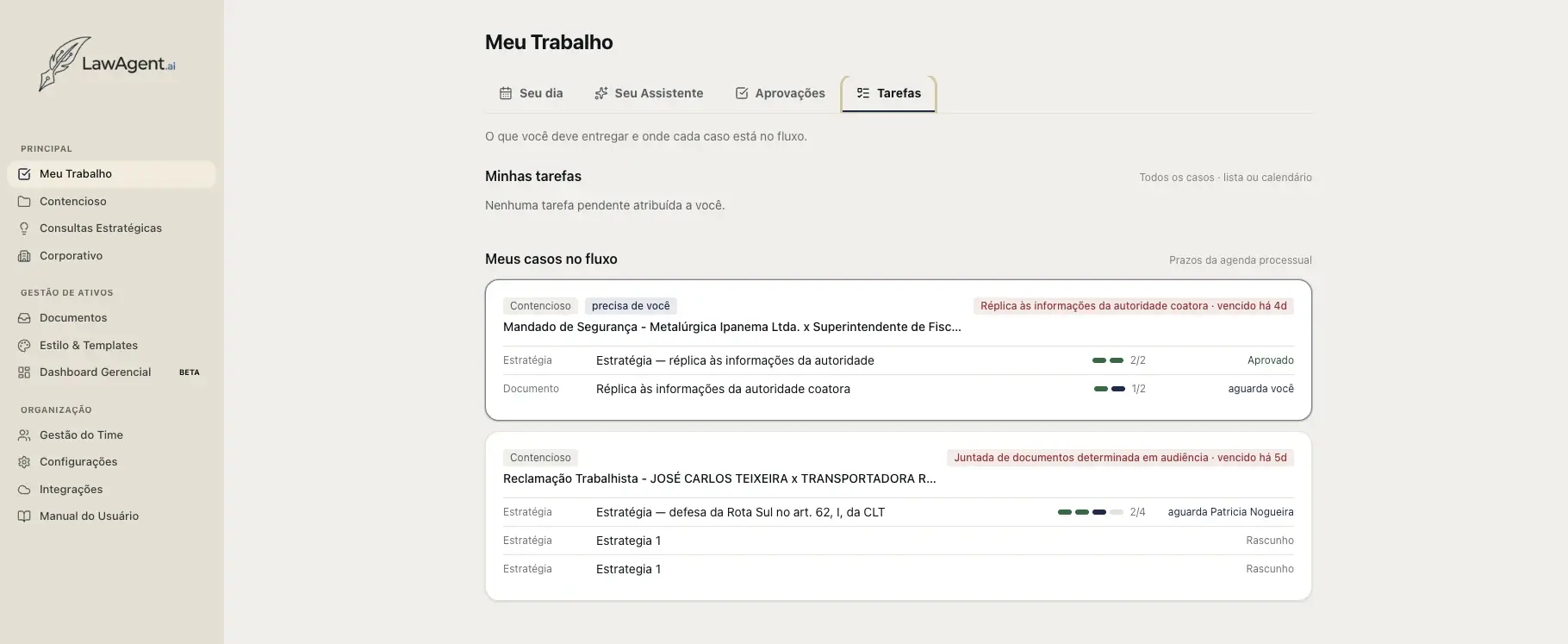
Tasks
Each task is linked to its case and its stage in the workflow — from draft to approval — so you don't have to open cases one by one to see what's pending.
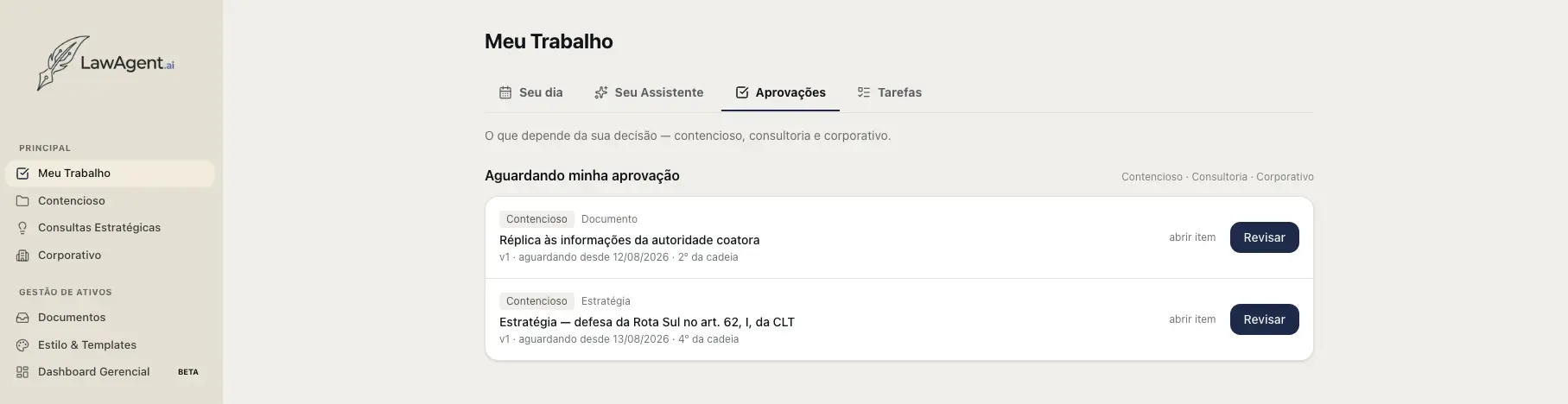
Approvals
Documents and strategies awaiting validation arrive sorted by priority, with a history of who has already approved them before you.
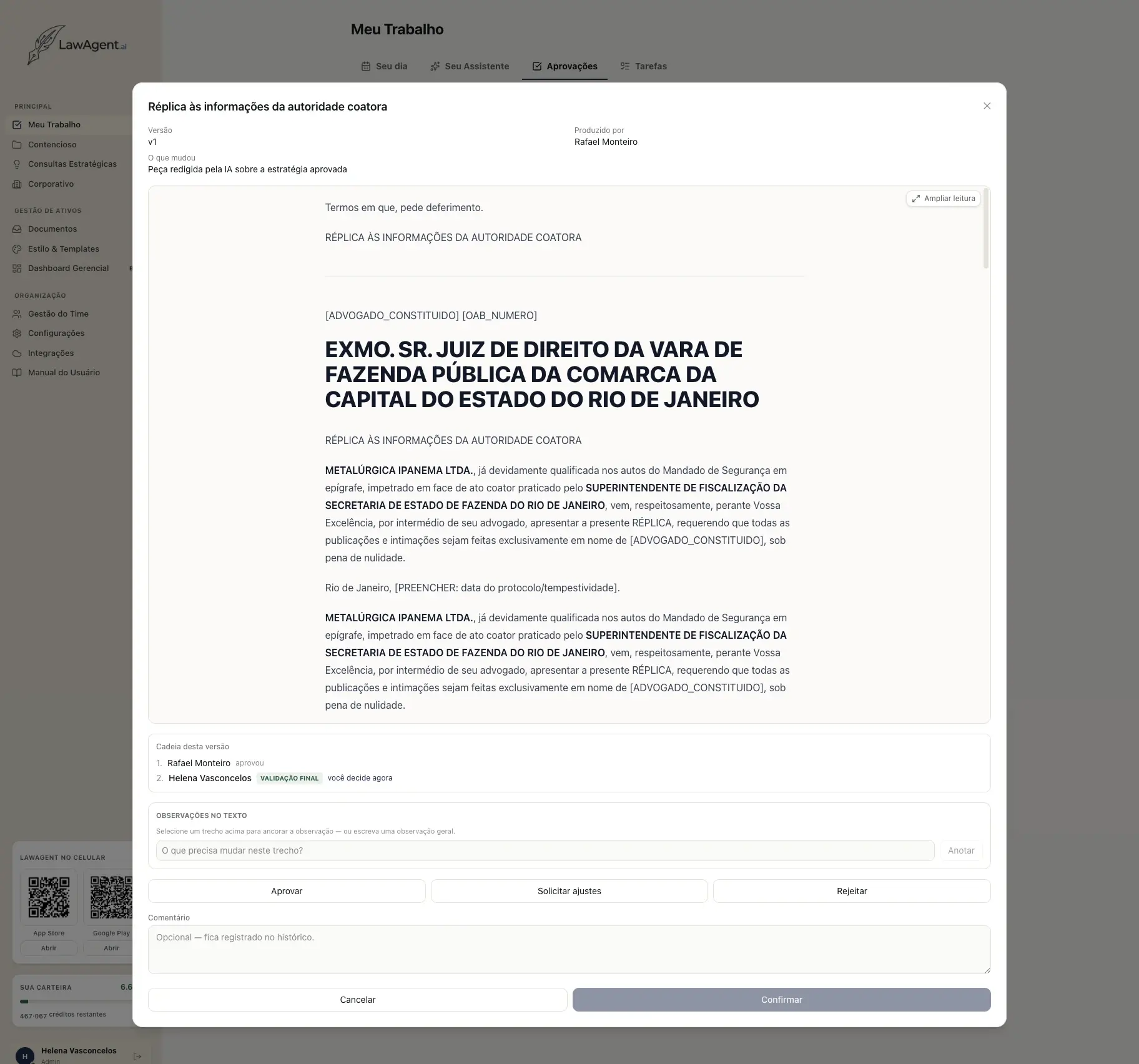
Review
A strategy or document has arrived for the user's approval. They can approve it and send it to the next level of the chain, reject it, or send it back to the previous level for adjustments.
Second step
Litigation
The full cycle of a case, from intake to a filing-ready brief — and the difference lies in what happens in between: strategy is discussed with an AI that has read the entire case file, the brief audits itself before it reaches the lawyer, every version climbs a recorded approval chain, and the case becomes a presentation-ready visualization. In the end, the same rigor applies to what the team wrote on its own.
Overview
Open the case and structure the strategy
A new case is born already classified: creation covers 28 areas of Brazilian law today, with a primary area and secondary areas that broaden the laws and sources the AI consults — brief structure still follows the primary area. Once created, the user opens the case from Case Management and lands on the Overview — progress, deadlines, and the key information gathered in one place. Alongside it, AI Advisory helps structure the strategy: it has already read the entire case and answers questions like “what are the weak points in our position, in the order the judge will face them”. With the legal ERP connected, this same screen shows the case's complete procedural movement, updated automatically by the firm's document management system.
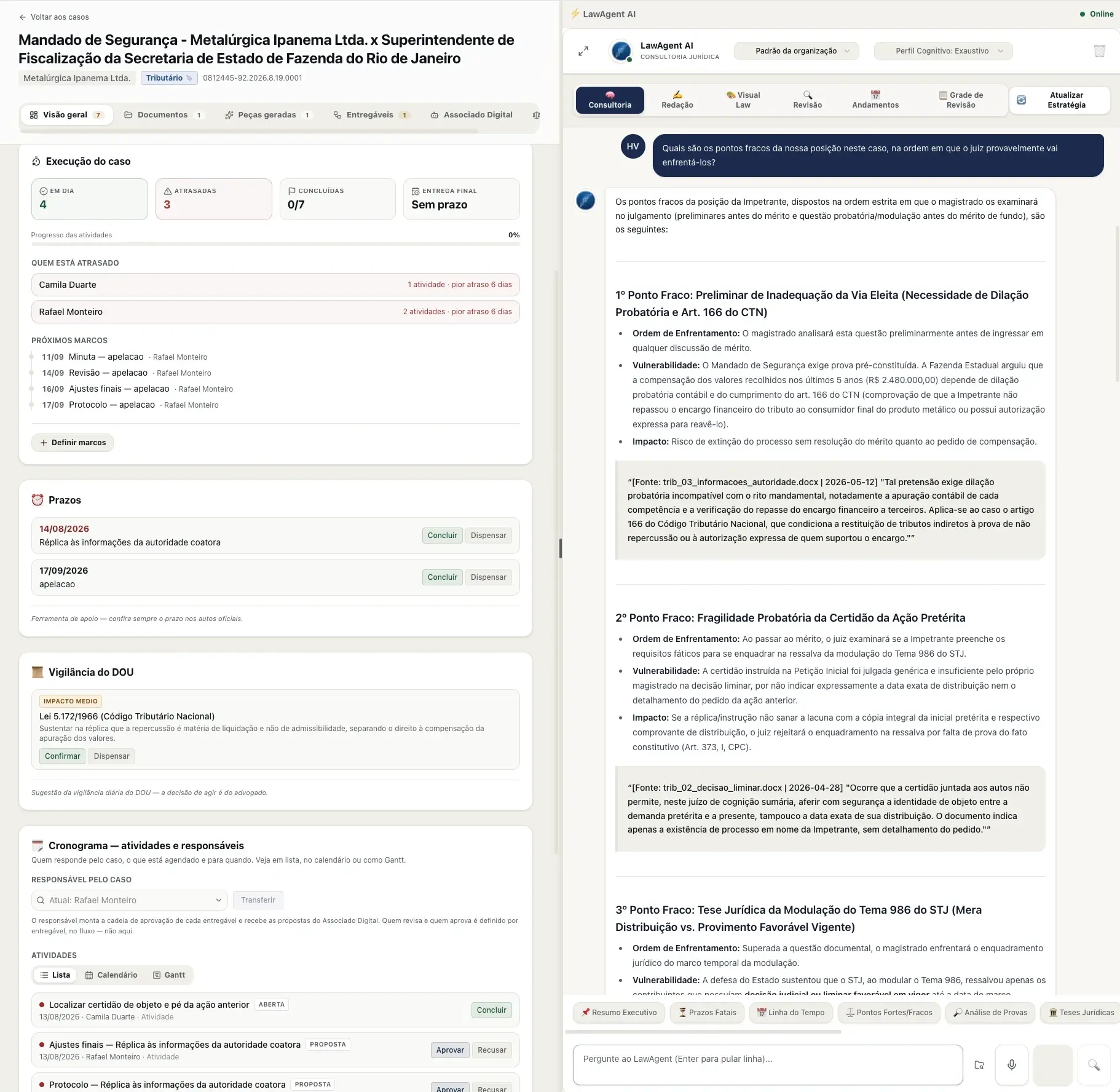
Overview and AI Advisory
Case execution, deadlines, Official Gazette radar, and timeline on one side; on the other, an advisor that has already read the entire case file.
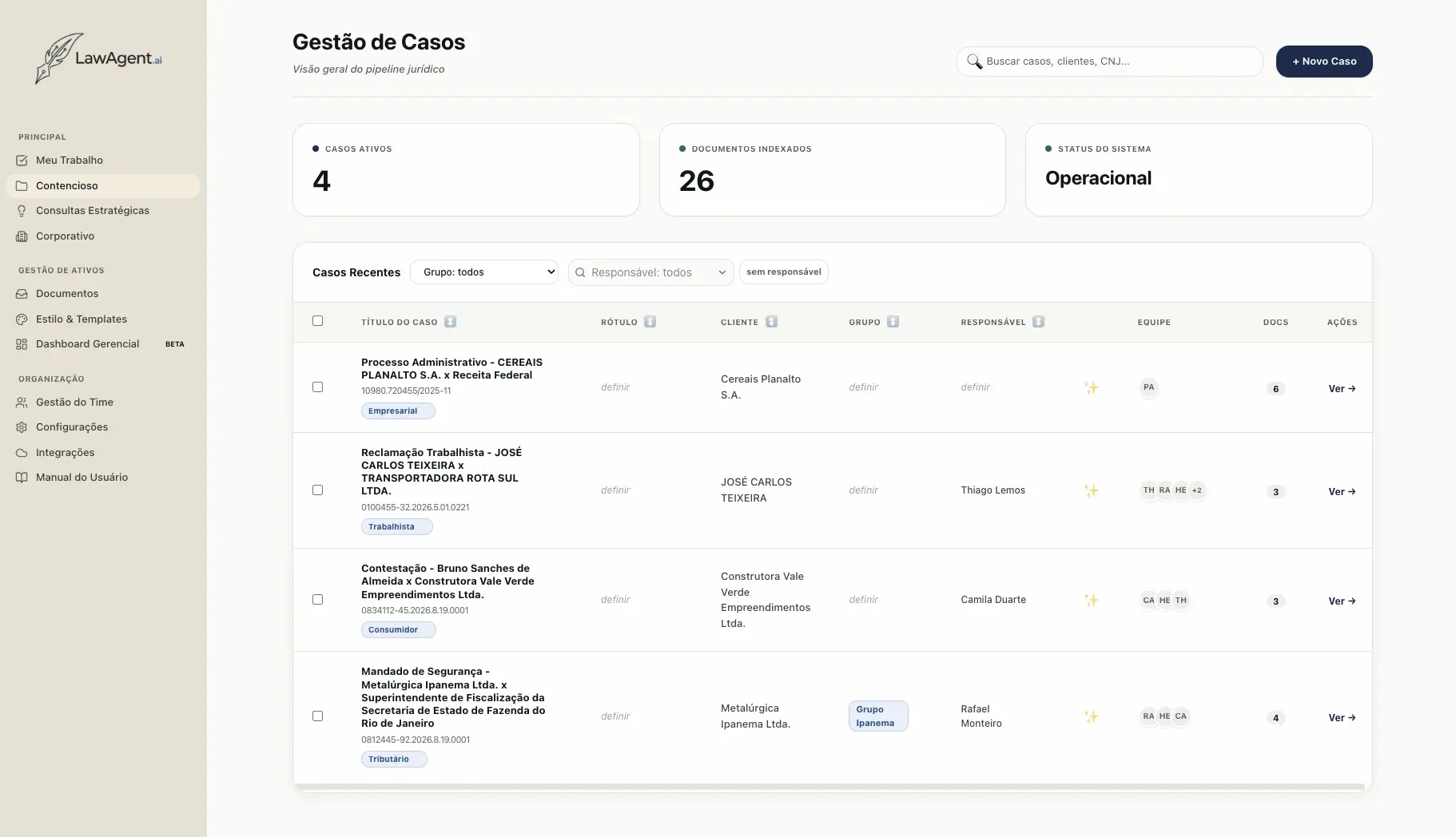
Case Management
The starting point: every case in the pipeline, with owner, team, and indexed documents.
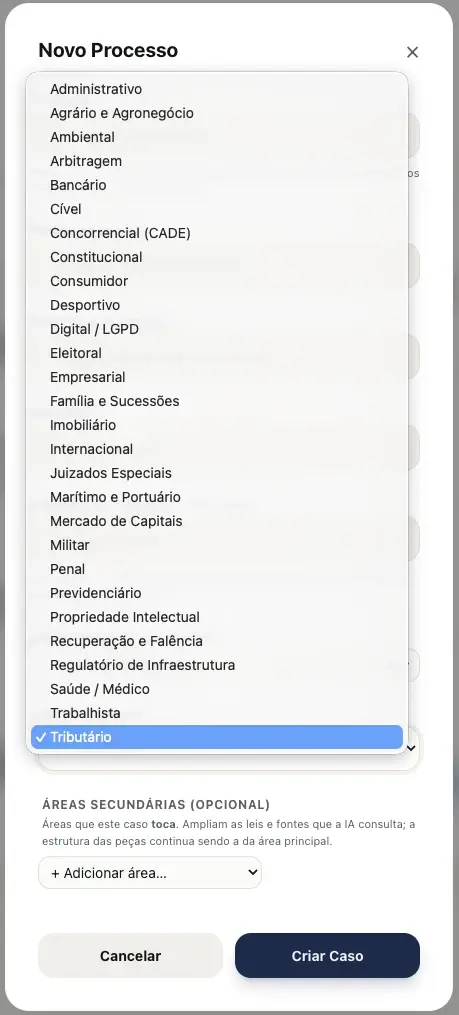
28 areas of law
Primary area and secondary areas — brief structure follows the primary area; secondary areas only broaden the sources consulted.
Digital Associate
Delegate a finished deliverable, not a question
The Digital Associate is different from the advisory chat: instead of a conversation to answer questions and explore the case, here the user delegates a finished deliverable. Describe the task — an email draft that lands straight in the user's drafts folder, an executive summary of the case, a spreadsheet filled in with the relevant information — and the Associate plans, executes, and returns the finished document for review. Nothing is filed or sent automatically: the deliverable comes back for the user to decide.
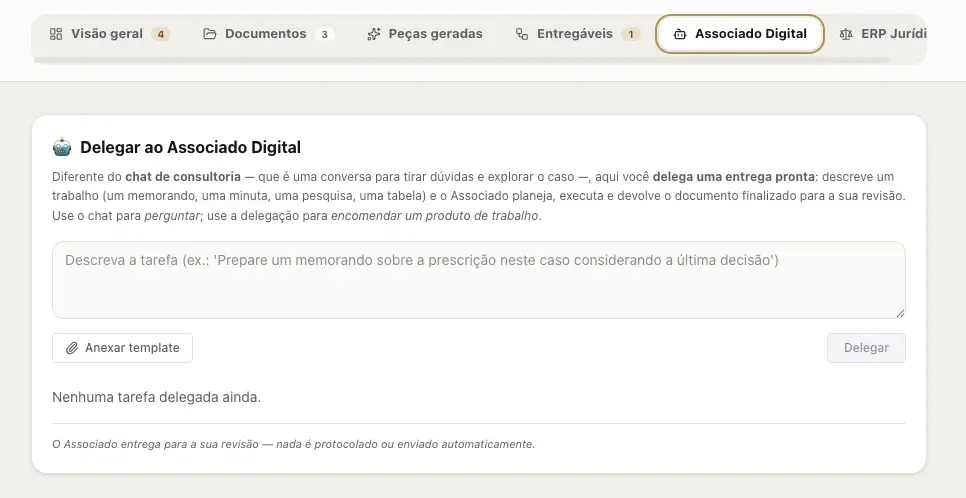
Delegate to the Digital Associate
Describe the task in natural language — memo, draft, research, spreadsheet — and the Associate delivers it for review.
Drafting
Brief drafting with self-auditing
With the strategy approved, the brief is drafted in the chosen DNA — that of a specific team member or the firm's own standard. What sets it apart from ordinary text generation is what runs before it ever reaches the lawyer: a chain of AI and deterministic steps that audit one another. Case law is checked against the courts' official API; a precedent citation number that doesn't exist in any verified source is flagged in red as a fabricated citation; a structural validator points out any required sections that are missing; and self-review already fixes what it can, leaving the rest as an open flag. The brief arrives together with this report — showing what was verified, what needs attention, and what still needs to be produced in the case file — instead of arriving as text that merely looks finished.
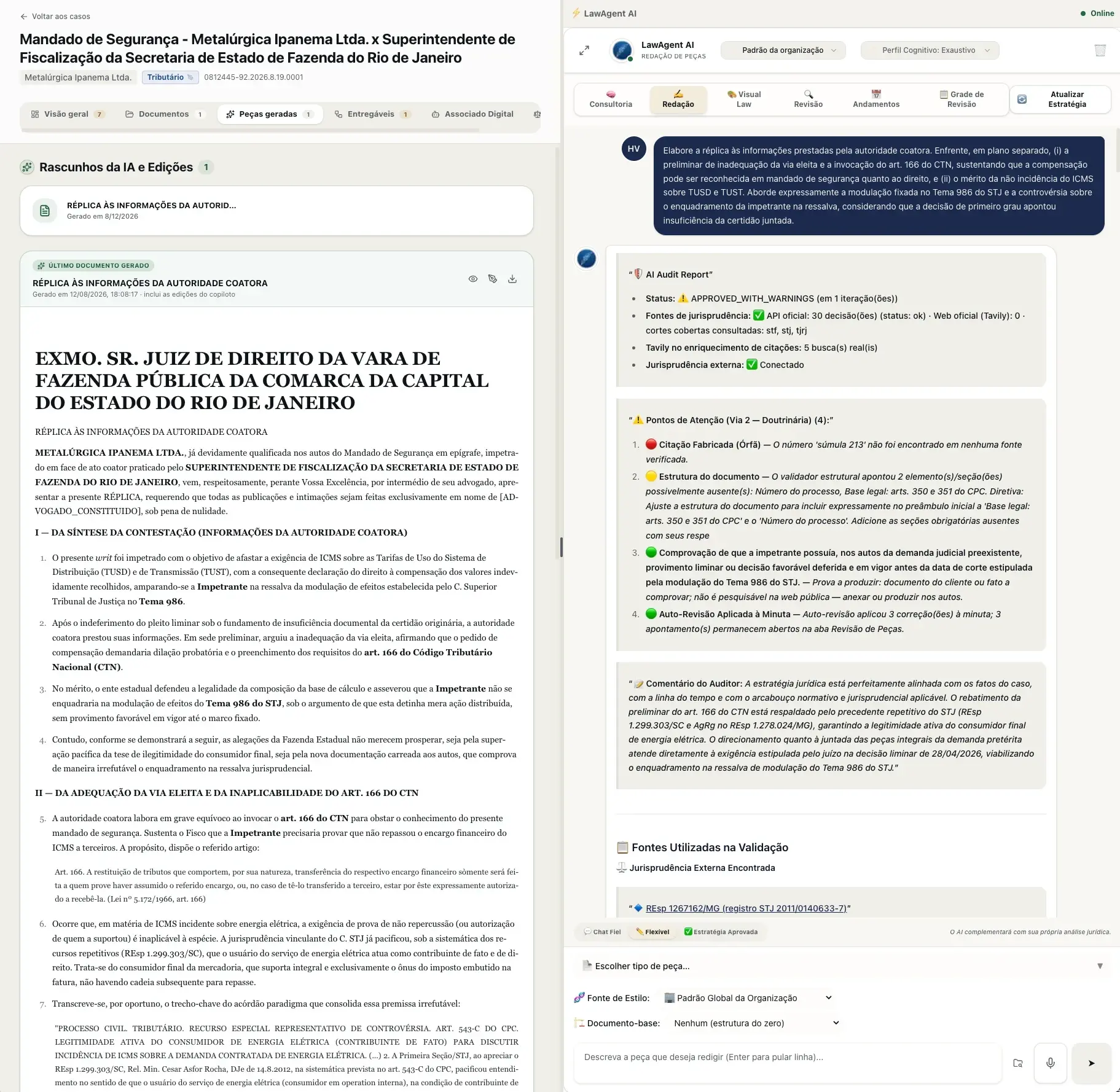
Drafting and self-auditing
Approval status, case-law sources consulted, flagged points classified by severity, and the auditor's comment — before any human reviews it.
Approval
Strategy and document follow the same approval flow
Strategy and document climb the same approval ladder, configured by the firm: up to four levels, with a named owner at each step and the last one validating and closing out the deliverable. The rule that keeps the process safe is simple — with every new version, approval restarts from the first level; an approval applies to the approved version, not to the document in general. The firm also chooses, per workflow, who produces the work: the team or the Digital Assistant, without changing who approves it. The result is an auditable trail of who wrote it, who reviewed it, who released it, and in what order.
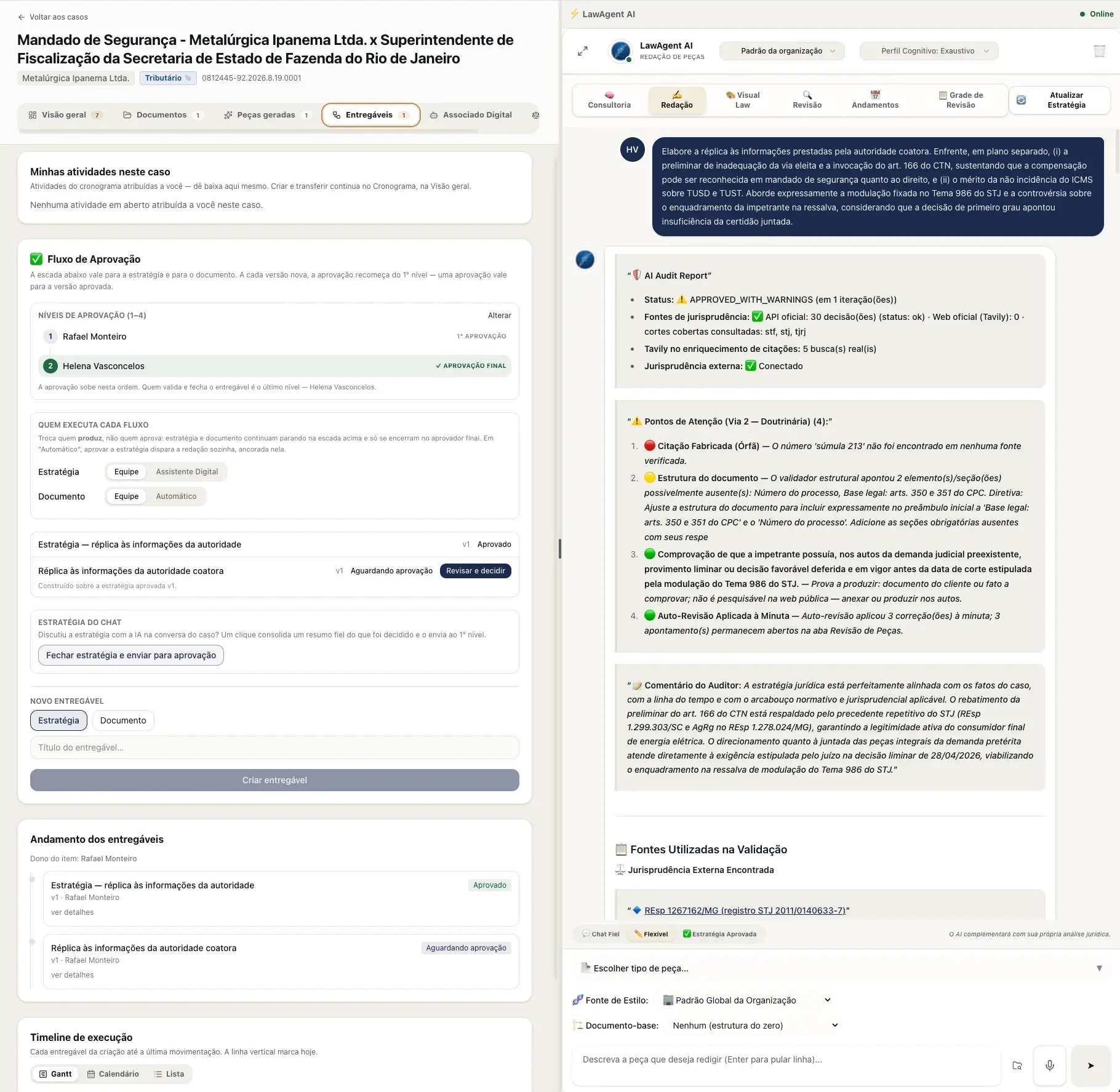
Deliverables and approval flow
Approval levels, who produces each stage, and the complete history — from the approved strategy to the document awaiting final validation.
Visual Law
The case becomes a visualization — and a presentation
The same case, read from seven different angles — relationship map, metrics, timeline, executive summary, risk matrix, theses and evidence, and an editorial infographic. None of these is a generic illustration: all of them are built from the documents in the case file, with the source of each piece of information indicated, and the user can steer the framing by describing the emphasis they want. They serve both to let the lawyer see the whole structure of the case at once and to bring to a client meeting — and the presentation comes out as a .pptx with one click, with no one building a single slide.
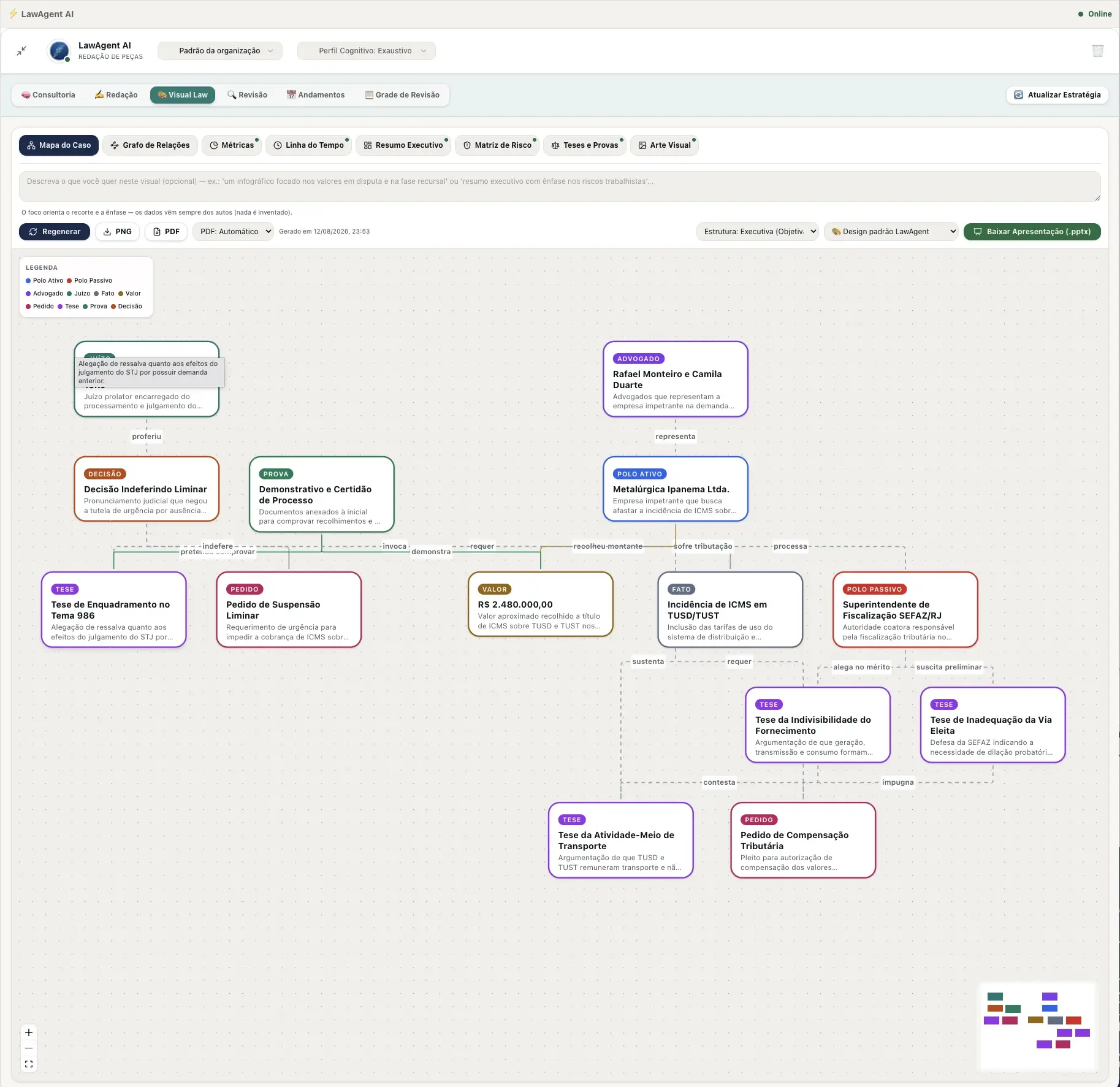
Case Map
Parties, theses, evidence, claims, and rulings related in a graph — the entire structure of the case, all at once.
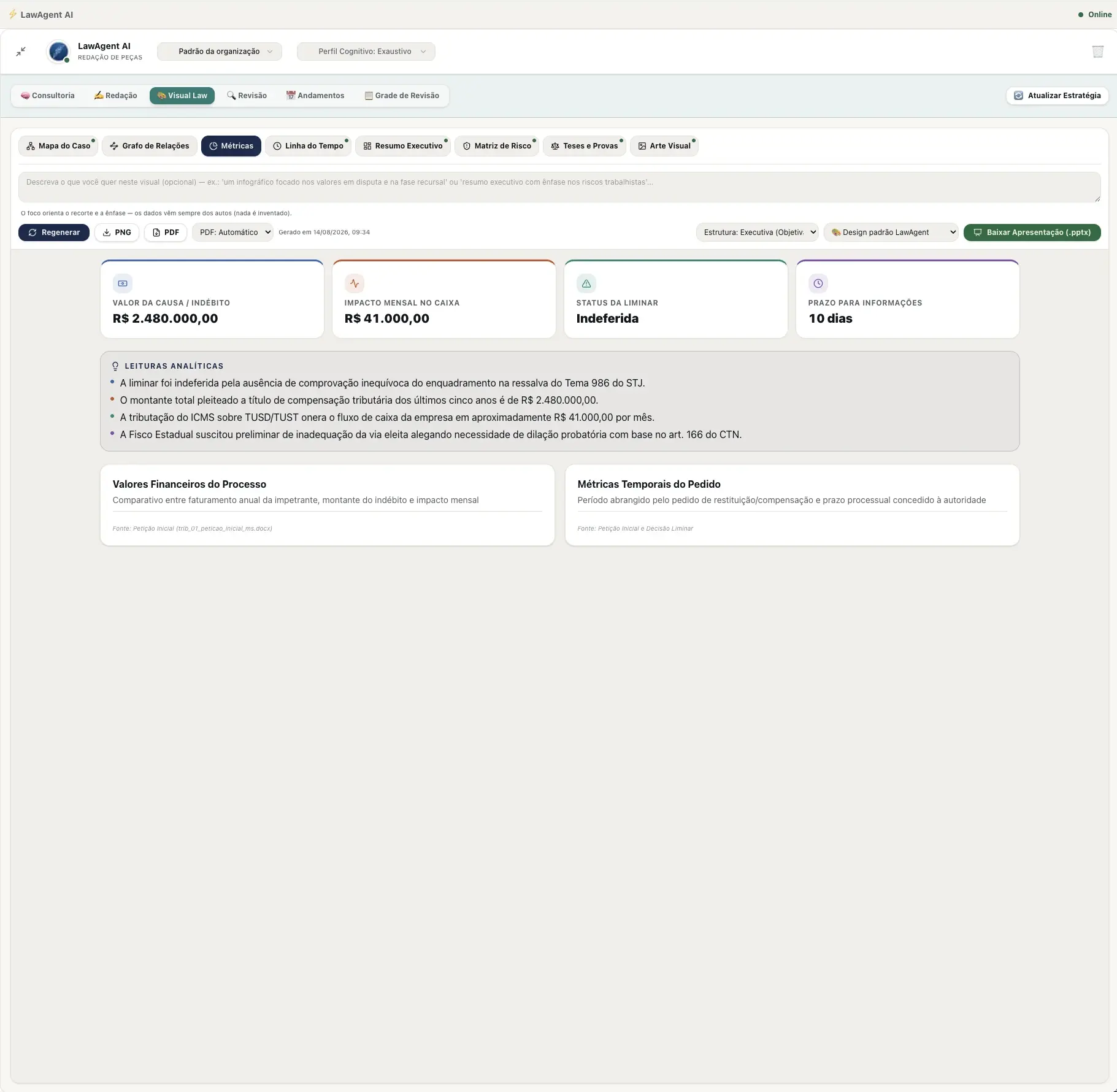
Metrics
Case KPIs and analytical readings extracted directly from the case file.
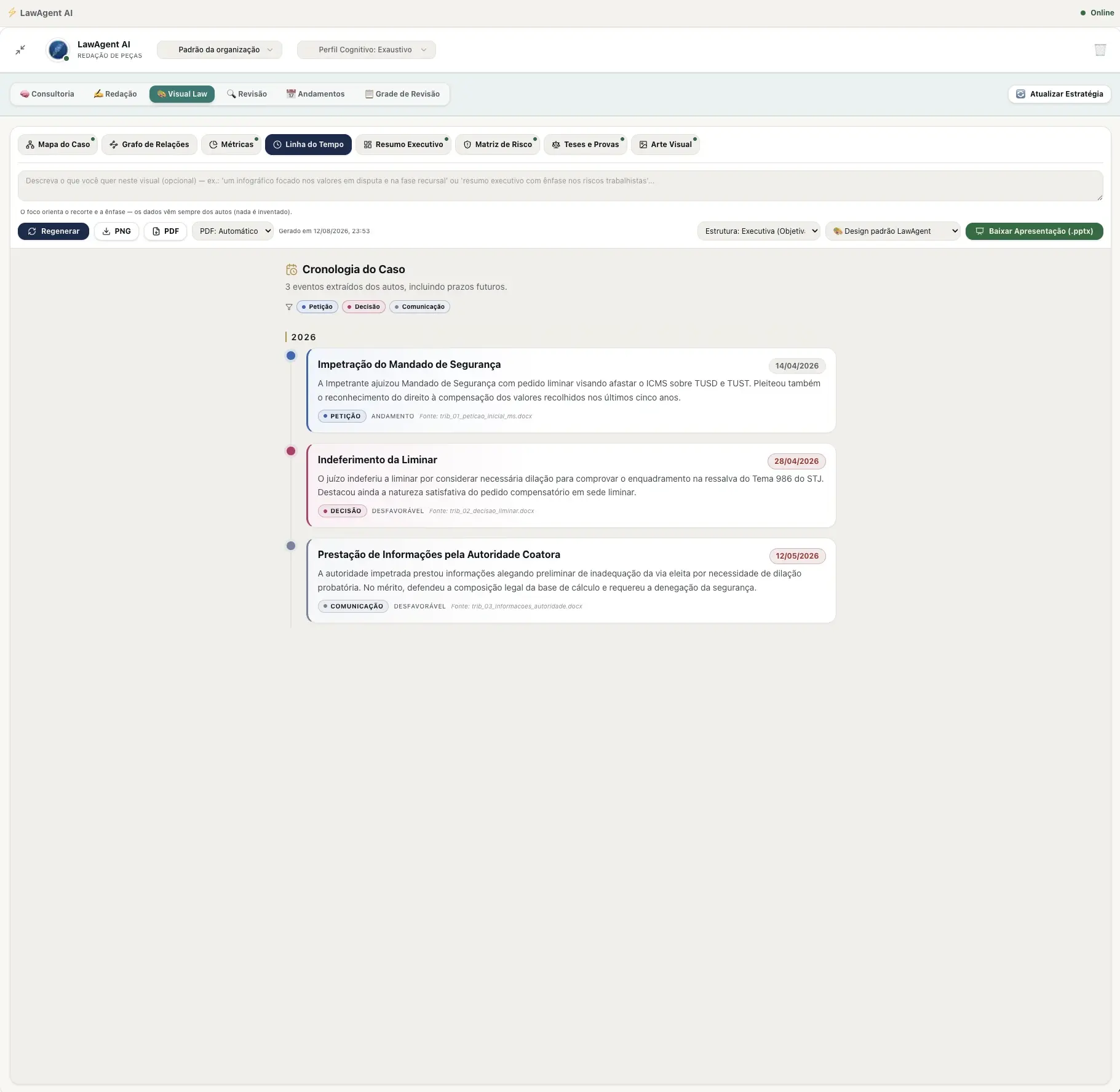
Timeline
Case chronology extracted from the case file, including upcoming deadlines.
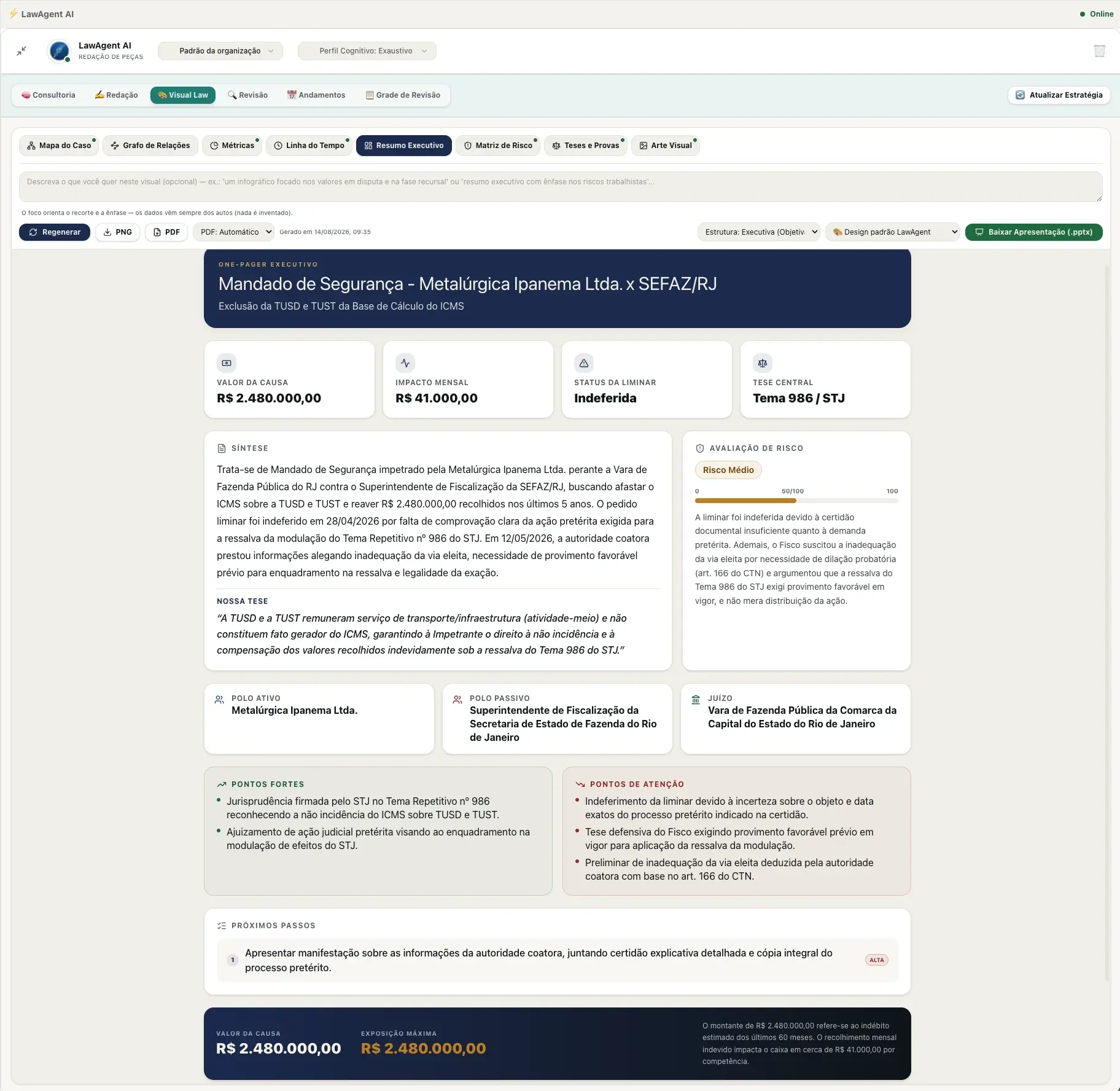
Executive Summary
A one-pager with synopsis, central thesis, risk assessment, and next steps — ready to bring to a meeting.
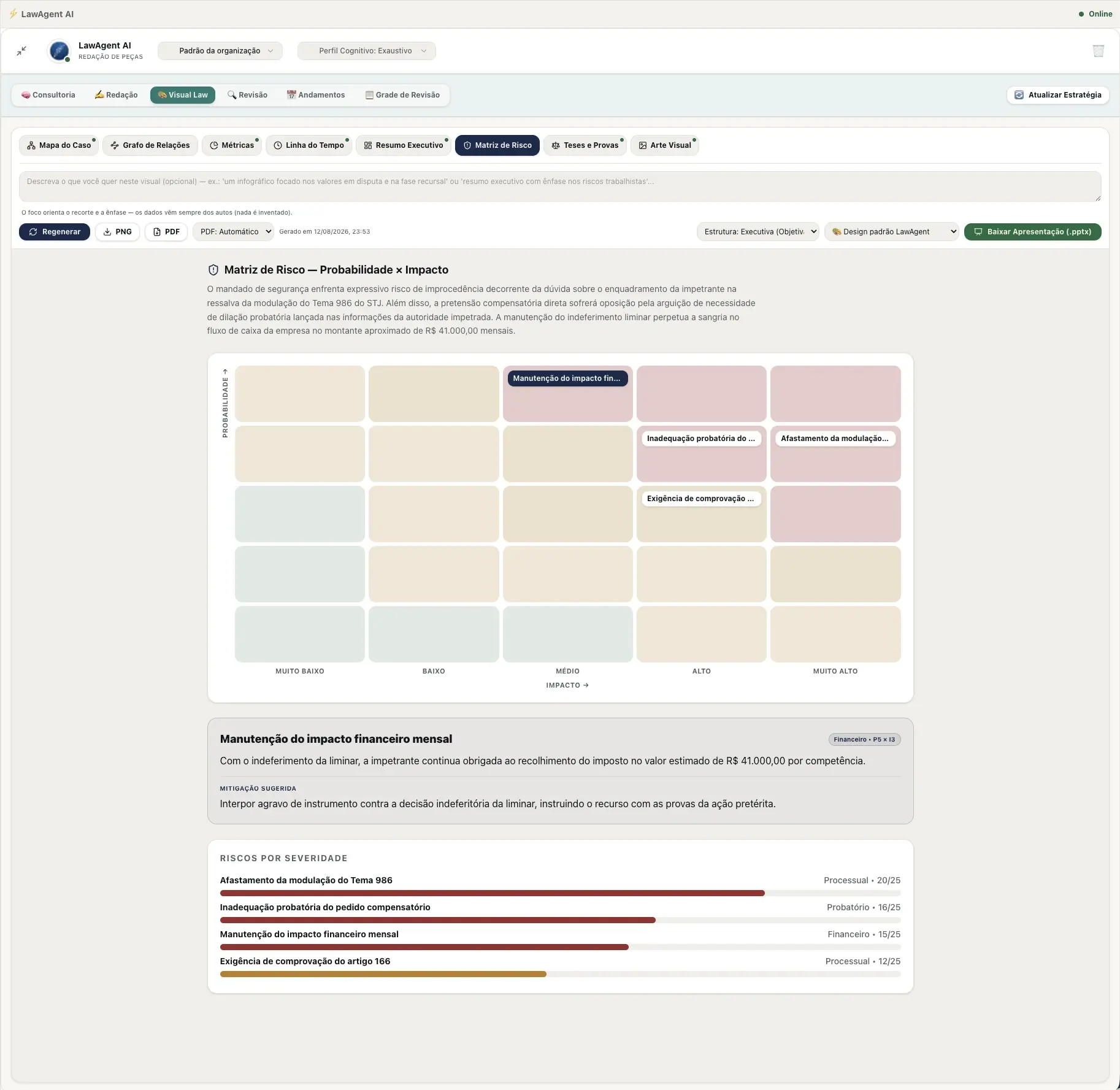
Risk Matrix
Probability × impact for each risk in the case, with the suggested mitigation for the most critical one.
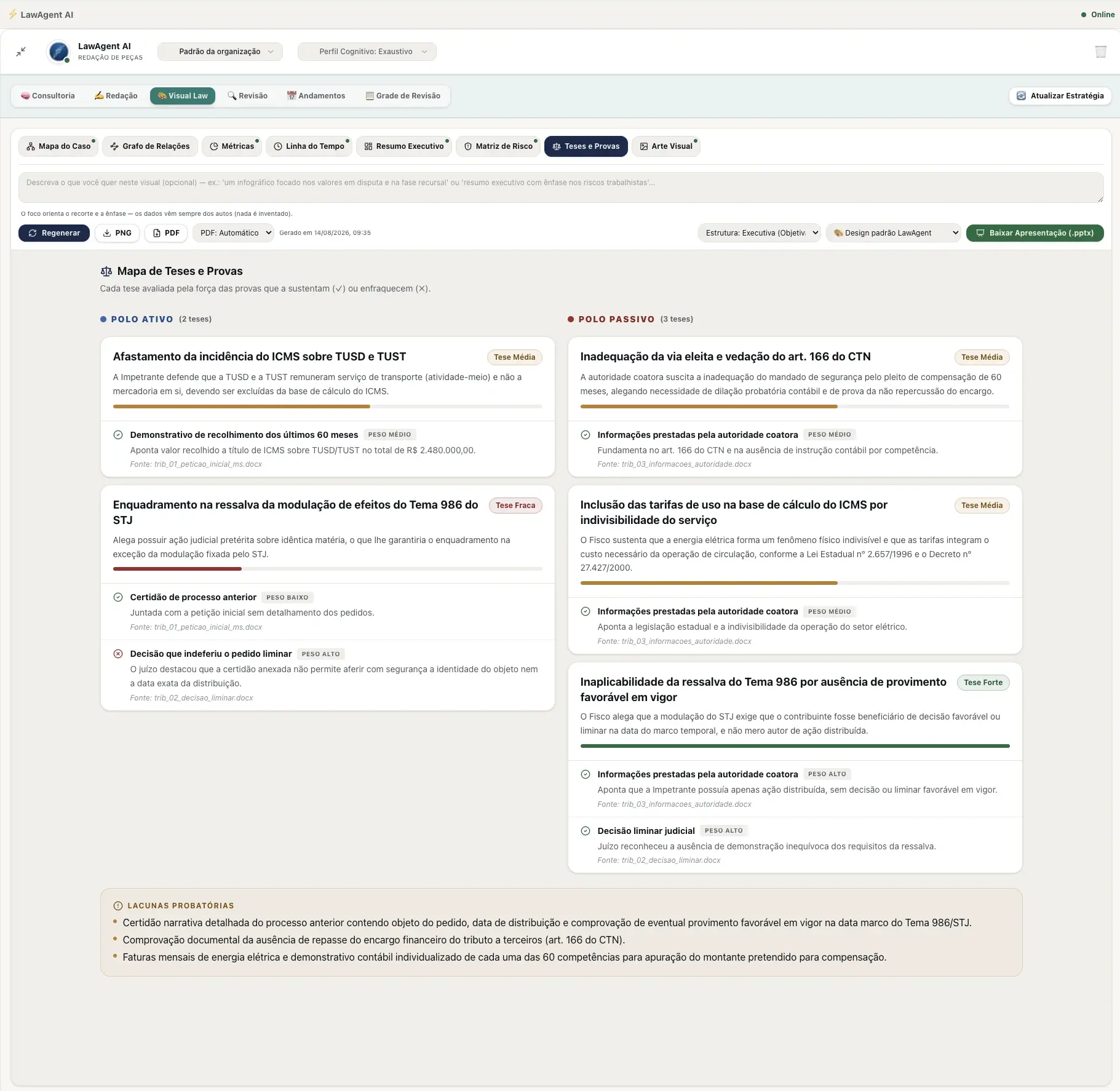
Theses and Evidence
Each thesis assessed by the strength of the evidence that supports it — from both sides — with open evidentiary gaps.
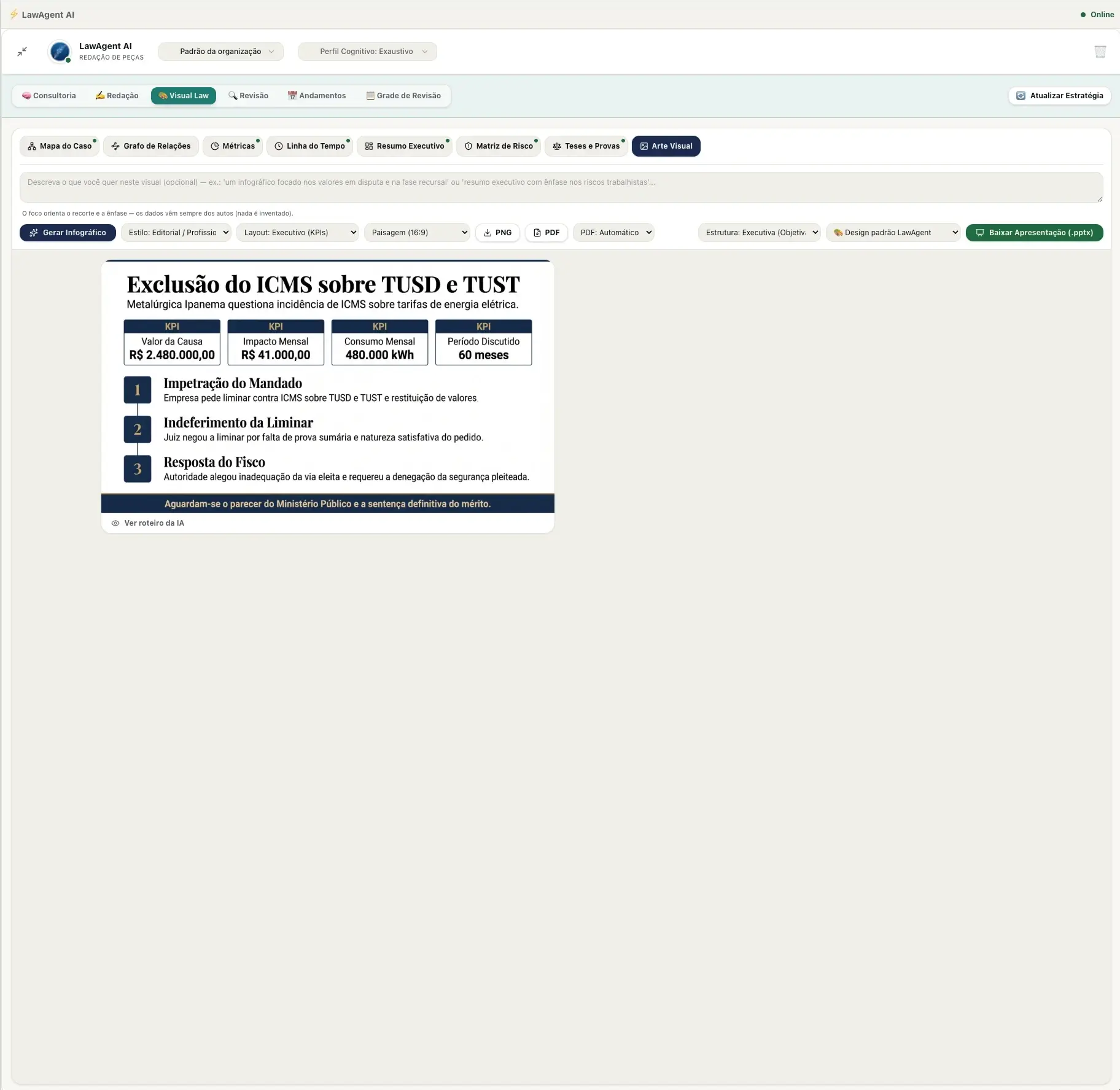
Visual Art
Infographic ready to export or take straight into a presentation.
Review
Review of what the team has already produced
Review covers the other side of the work: the draft that a team member wrote on their own and needs a second pair of eyes before filing. The brief is scored across four axes — admissibility, merits, strategy, and form — and the overall score isn't an average: admissibility caps the result, because a well-built case on the merits is worthless in a brief that won't even be admitted. The AI also locates the opposing brief in the case and builds point-by-point coverage: each allegation in the answer paired with the passage that responds to it and a verdict of sufficient, partial, or unanswered — this is where the omissions that go unnoticed in a quick read show up. Each flag is anchored to the exact passage and comes with ready-to-insert text, and the result comes out as a review .docx or as a redline with tracked changes, to send back to the author.
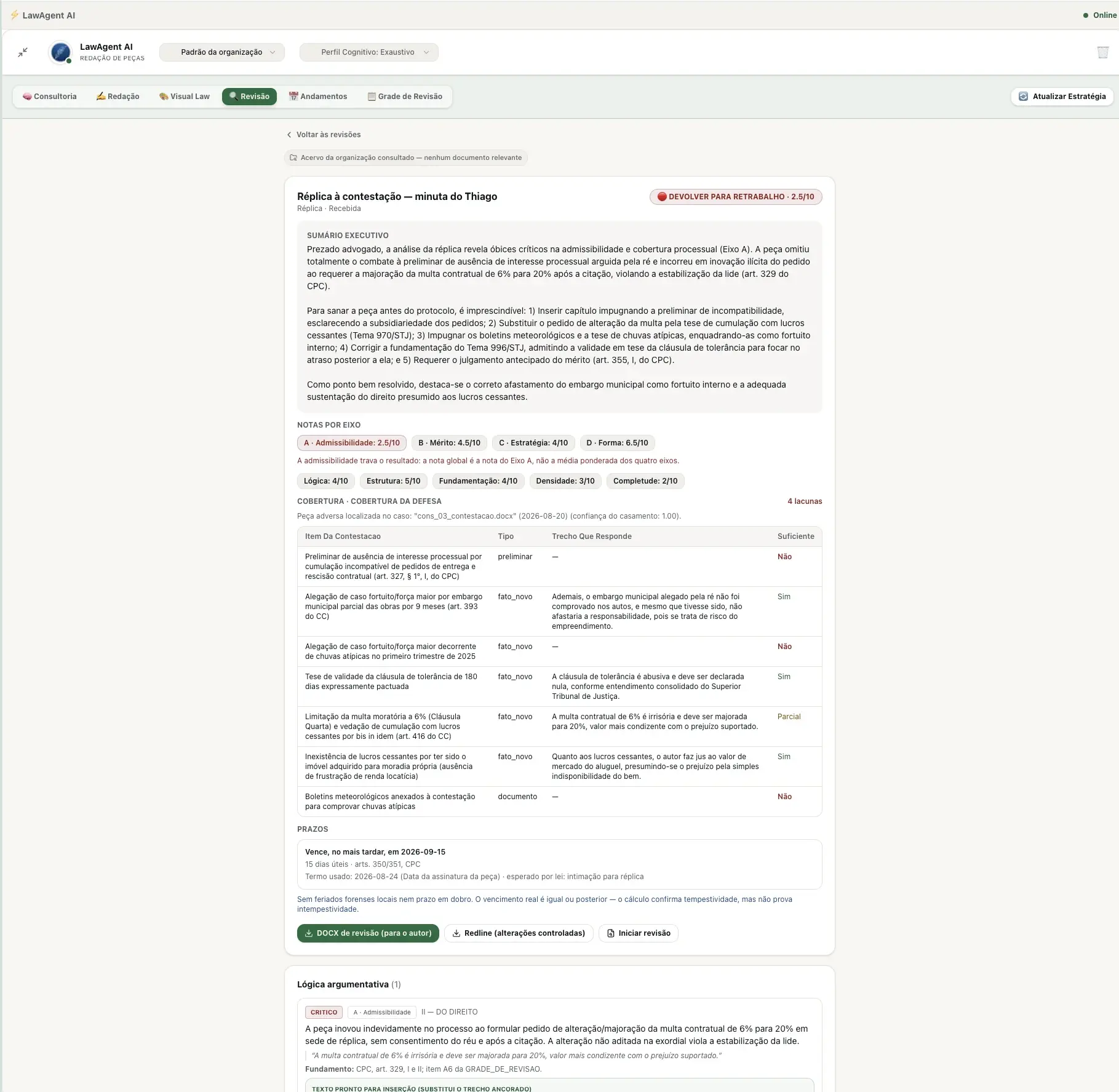
Review of third-party briefs
Scores by axis, point-by-point coverage of the opposing brief, and a calculated deadline — with export as a review DOCX or redline for the author.
Third step
Strategic Consultations
Strategic Consultations bring features in line with Litigation and add Deep Research: complete opinions for specific legal questions, not tied to a case, with the same technical rigor and the same low probability of hallucination — validated and curated sources, not a generic search. Every completed research report enters the firm's Knowledge Base and becomes available to feed future AI responses and substantiate the generation of new briefs: today's work becomes reusable context tomorrow.
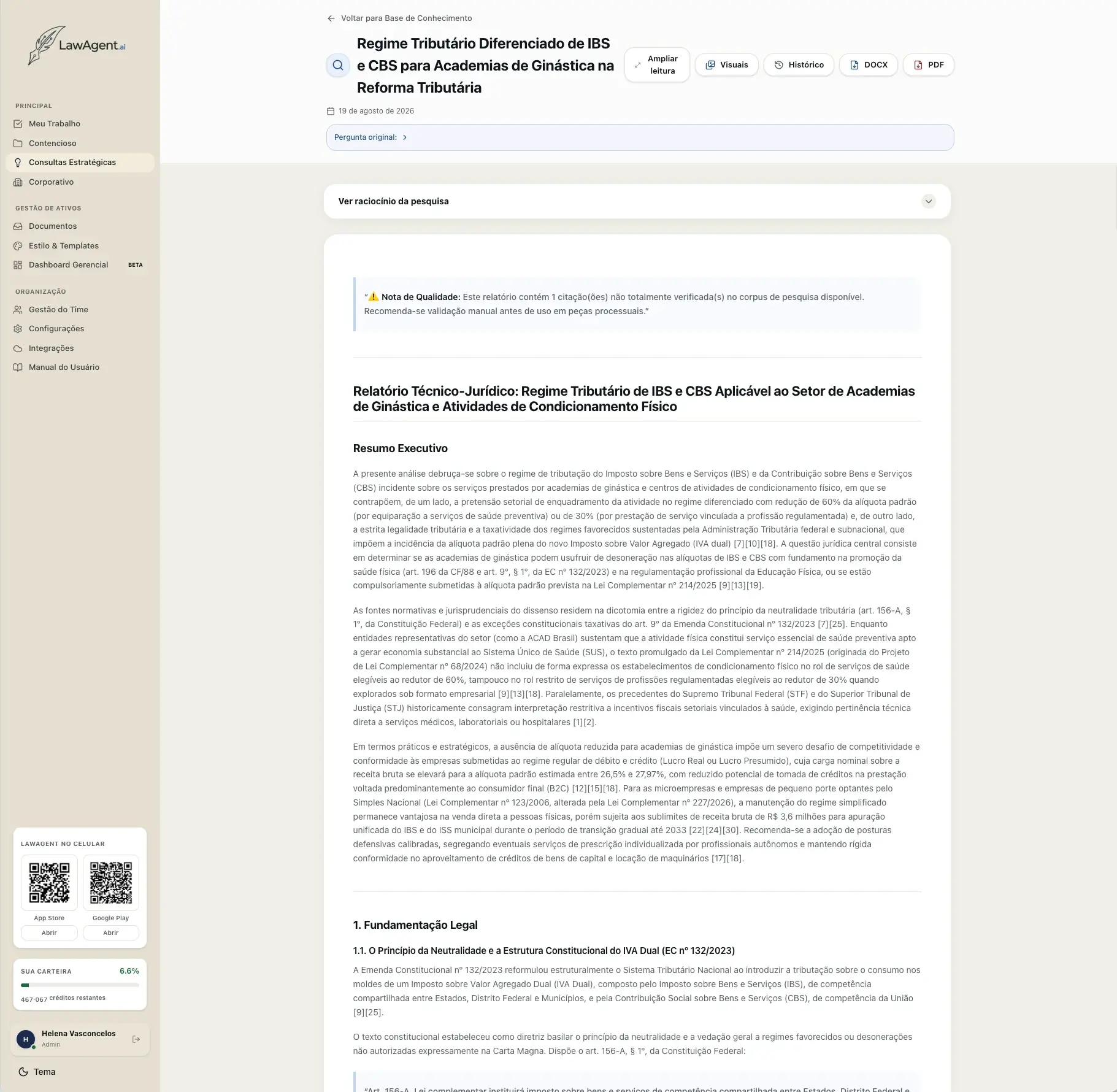
Deep Research Report
Executive summary, reasoning, and numbered citations — with an explicit quality note when a citation isn't fully verified in the available corpus. Exports as DOCX or PDF.
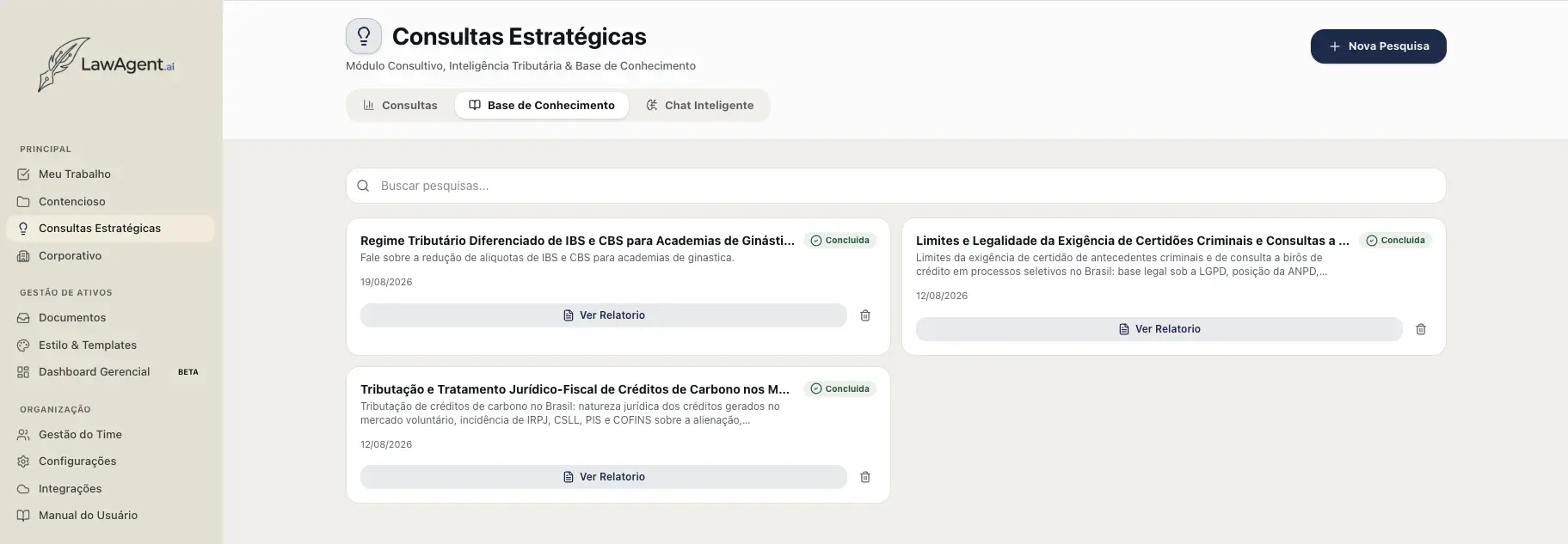
Knowledge Base
Every completed research report is organized and searchable — the institutional archive that the AI consults from here on.
Fourth step
Corporate
The Corporate module is the in-house legal department on a single screen: contracts, requests sent to outside counsel, provisioned contingencies, regulatory monitoring, due diligence, everyday questions, and contractual obligations — each area with its own supporting AI and with reports ready to bring to the board.
Contracts
+360 curated clauses — and the library is yours
Drafting contracts starts from an internal library of more than 360 curated clauses, covering a wide range of contract types. The draft is built from that base, with tailored fields and instructions — and whenever the AI uses a clause with no match in the library, it explicitly flags it so the user reviews it carefully. The user can edit existing clauses or add new ones, and with every adjustment LawAgent becomes more aligned with the company's standards and risk appetite.
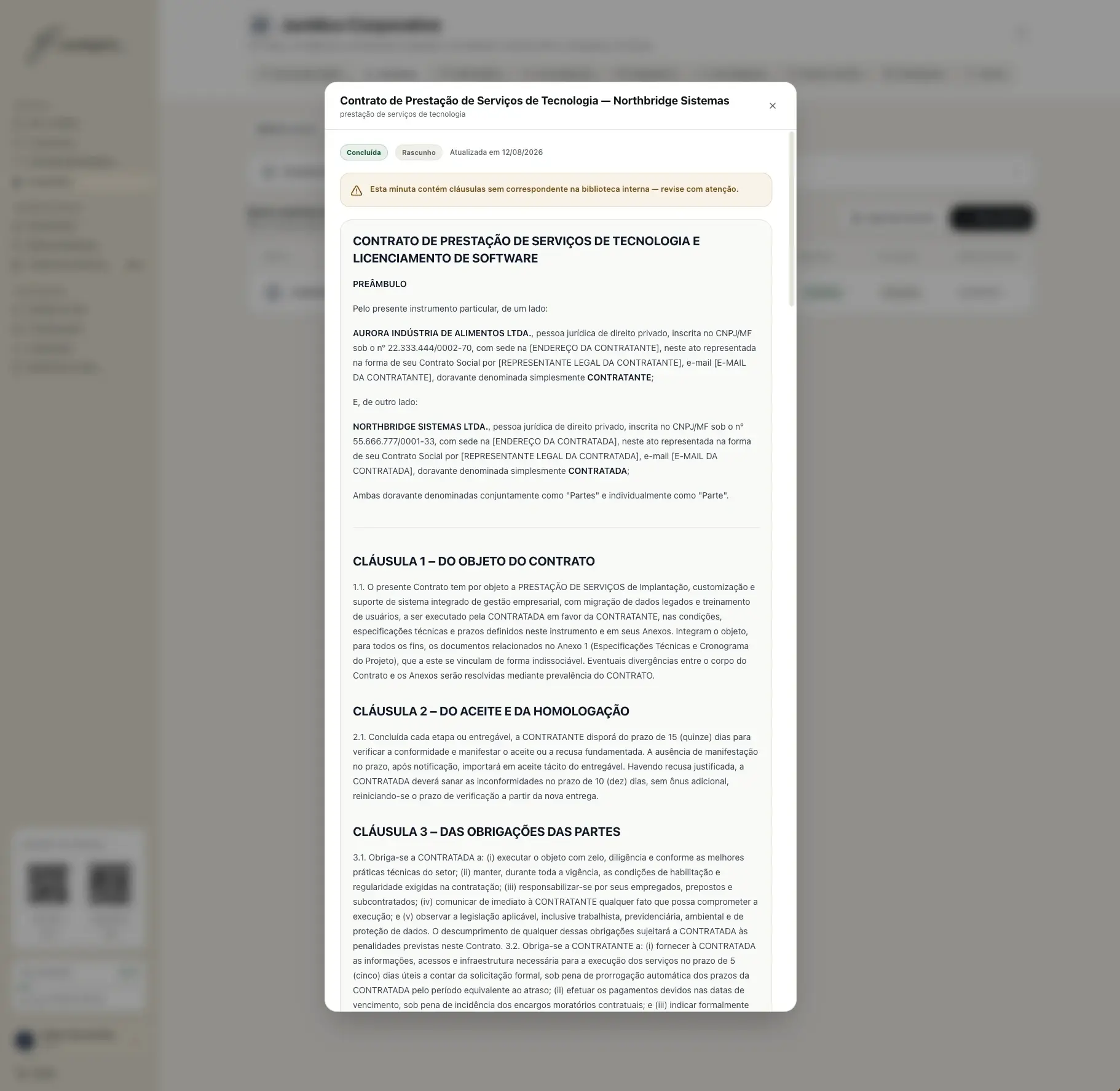
Draft generated from the library
Contract assembled with the company's curated clauses — with an explicit alert for any clause with no match in the internal library.
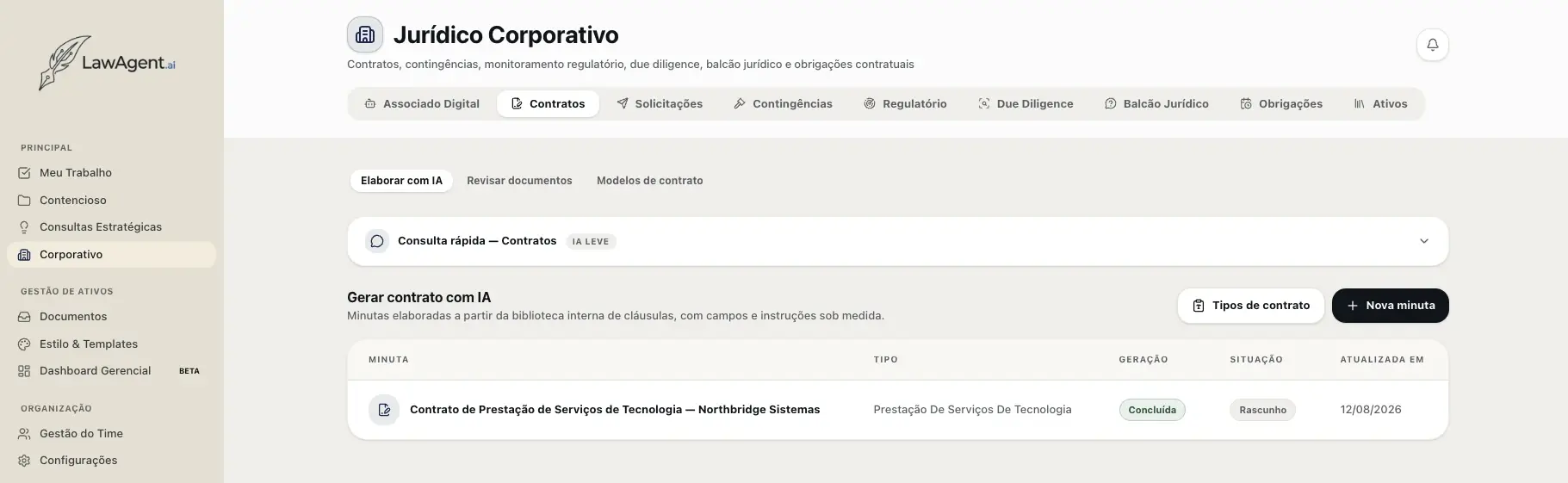
Draft, review, and template
Three functions in the same tab: generate drafts with AI, review incoming documents, and maintain the company's contract templates.
Third-party review
Incoming contracts, reviewed against your guideline
Still within Contracts, the user uploads drafts produced by third parties — outside counsel or the counterparty — along with the briefing and the strategic guidelines that shaped the work. The AI checks the document against that guideline and returns a complete executive report: an objective recommendation, critical and recommended findings in a table (clause, issue, rationale, and suggestion), and point-by-point adherence to what was requested — separating what was met from what was left out. The report can be shared with the author along with the redline in .docx.
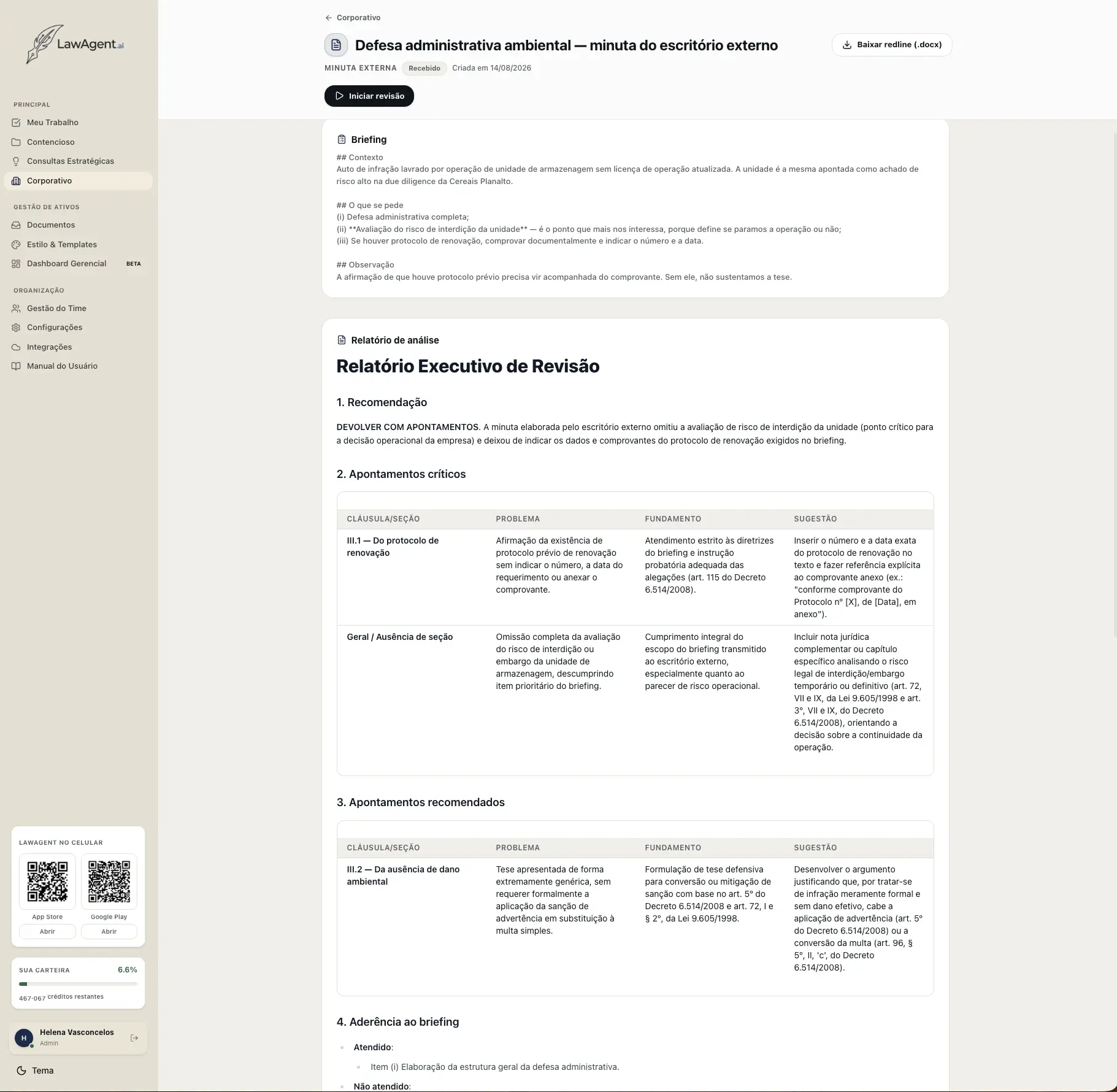
Executive review report
Recommendation, critical and recommended findings with rationale and suggested wording, and the adherence check against the briefing — with a redline in .docx to send back to the author.
Requests
Every request sent outside, under control
When in-house legal engages outside counsel, the request is born here: briefing, subject matter, deadline, responsible firm, and budgeted fees. The area tracks the status of each request — draft, in progress, delivered — with overdue deadlines highlighted, and receives the deliverable straight into a review. At the top, the financial summary shows total budgeted, total spent, and the percentage of budget consumed, along with the spending ranking by firm. It's useful both for not missing deadlines and for defending the department's budget with numbers. The whole portfolio imports and exports to .xlsx.
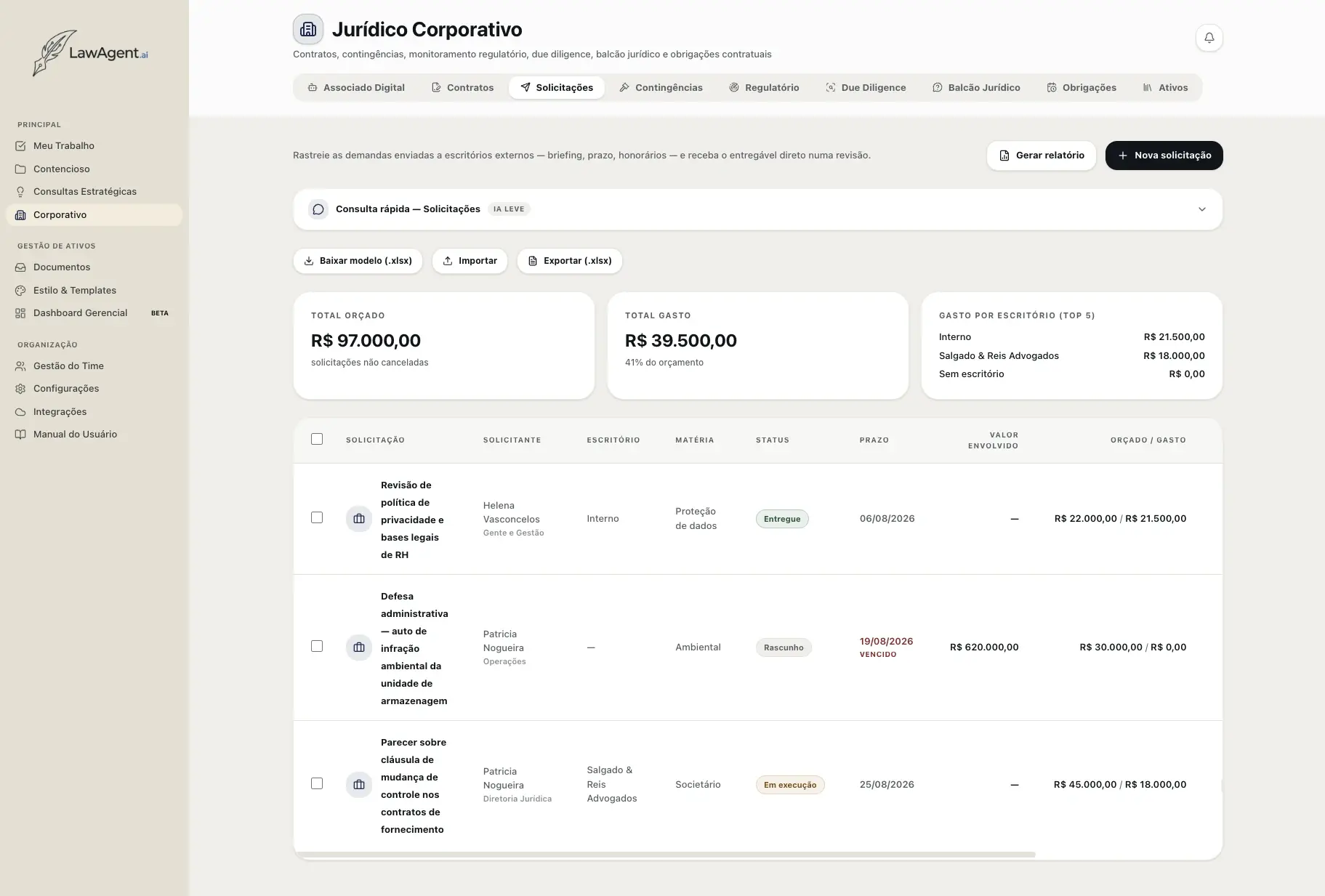
Requests to outside counsel
Briefing, deadline, subject matter, and fees per request — with the budgeted-vs-spent summary and the ranking by firm at the top.
Contingencies
The litigation portfolio with suggested provisioning
Contingencies bring together the portfolio of cases with a prognosis and suggested provisioning under NBC TG 25 — probable, possible, or remote — with total exposure and provisioning calculated over the filtered portfolio. Each case can have its prognosis assessed by the AI, and the quarterly report can be generated automatically at the start of each quarter, with a notice in the alerts. There are three report types: NBC TG 25, the technical-accounting report on provisions and contingent liabilities for closing; Management Summary, the executive view of the portfolio with consolidated exposure and risks; and One Pager, the single-page summary for the board and directors. Each one is exported as XLSX, PDF, or PPT, by period and reference date — and the user can also describe the desired emphasis in free text, knowing the numbers always come from the registered data.
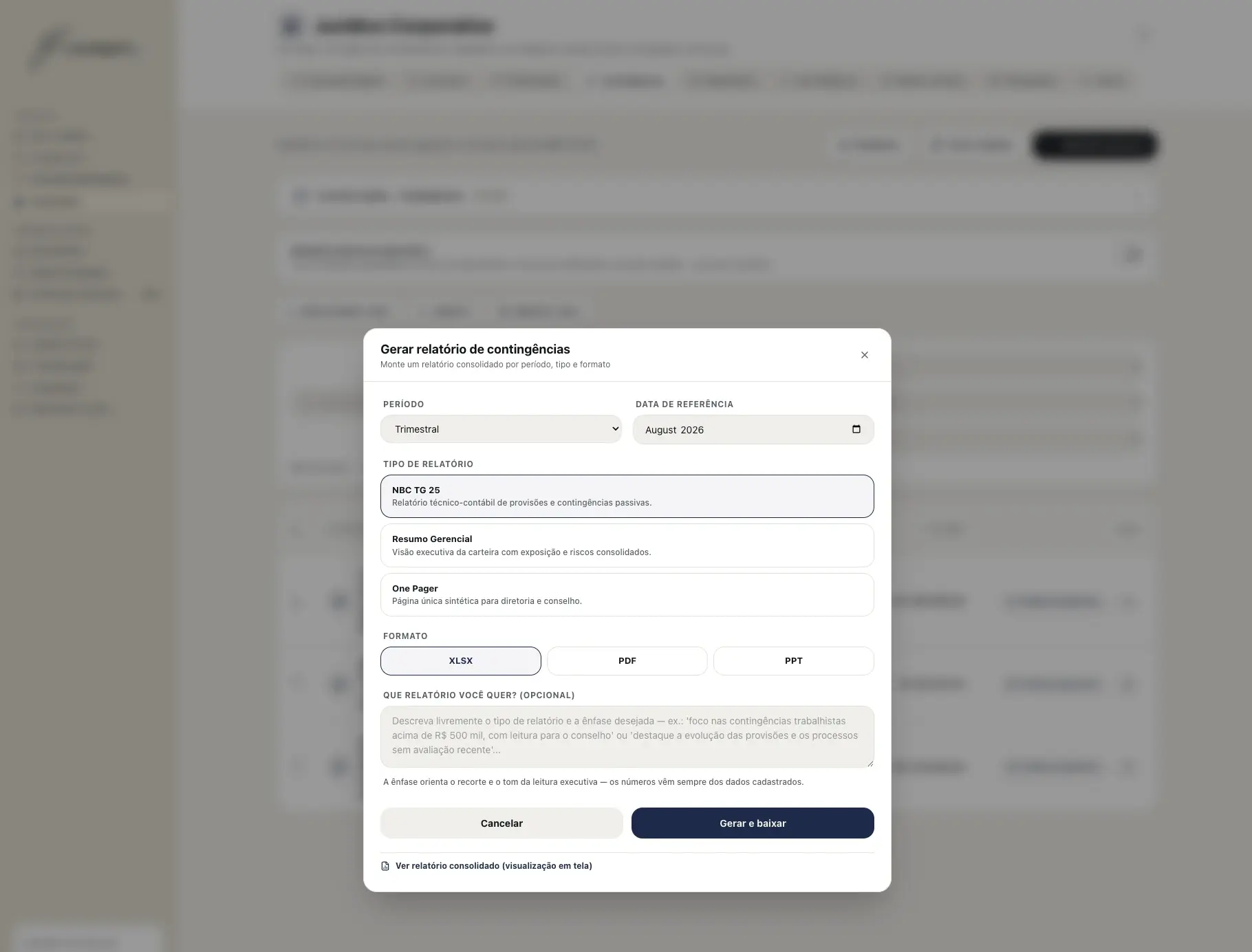
Reports by type and format
NBC TG 25, Management Summary, or One Pager — in XLSX, PDF, or PPT, by period and reference date, with the emphasis described in free text.
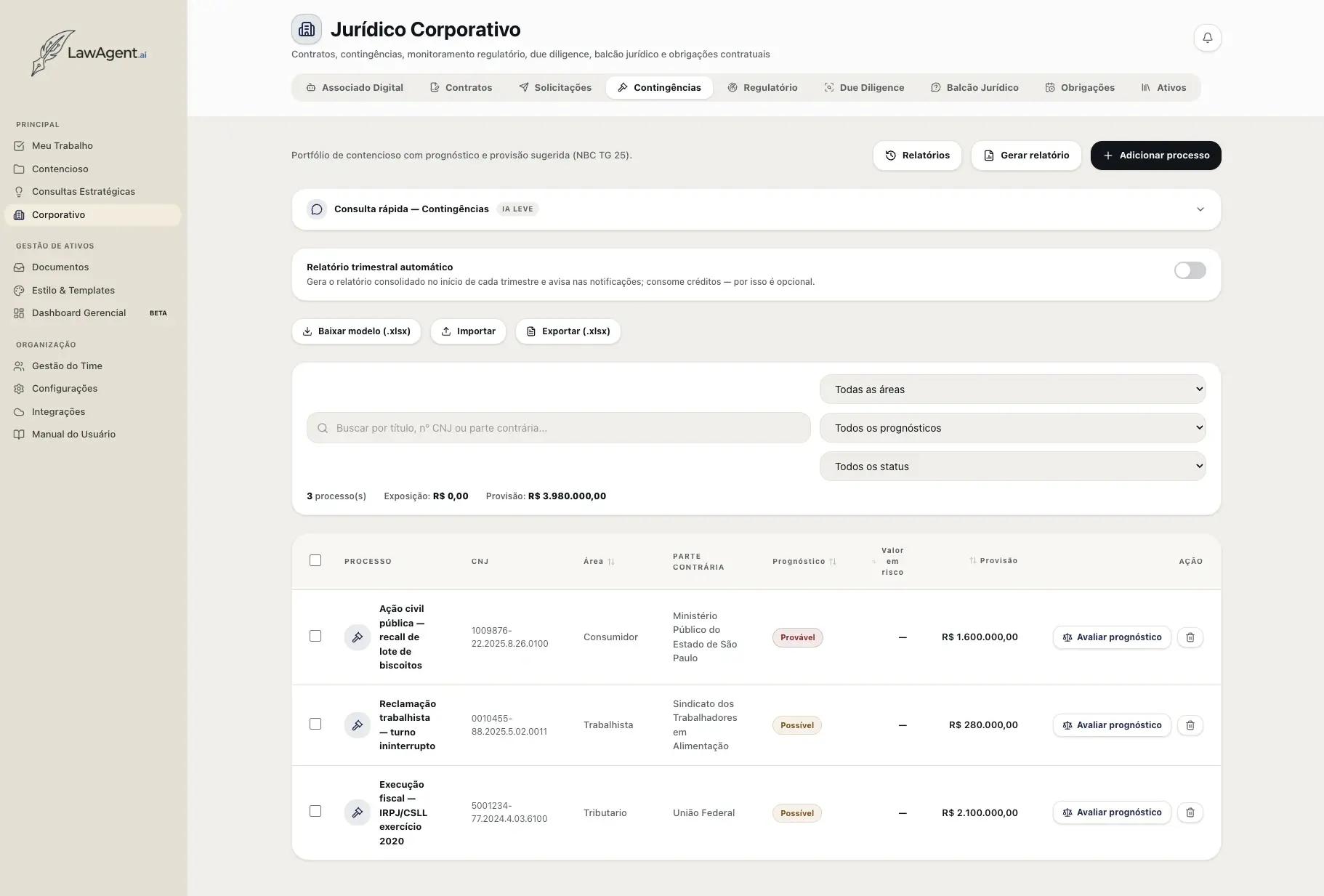
Portfolio with prognosis and provisioning
Consolidated exposure and provisioning, AI-assessed prognosis per case, and an optional automatic quarterly report.
Regulatory
Regulatory monitoring filtered by your business
The company describes its own regulatory profile once — activity, markets, sectors, topics — and selects the agencies it wants to monitor among ANEEL, ANVISA, ANATEL, ANP, ANS, ANAC, ANTT, ANTAQ, ANM, ANA, ANCINE, BACEN, CVM, SUSEP, CADE, INMETRO, IBAMA, ANPD, and MAPA. The scan searches for resolutions and ordinances on the official domains of each selected agency and returns alerts already filtered by the profile — not a raw feed of publications. Each alert arrives classified by impact and brings two things that save reading time: the impact analysis, stating exactly what it affects in the company's operations, and the recommended action, with the concrete next step. The user marks it as reviewed or dismisses it, keeping the queue clean.
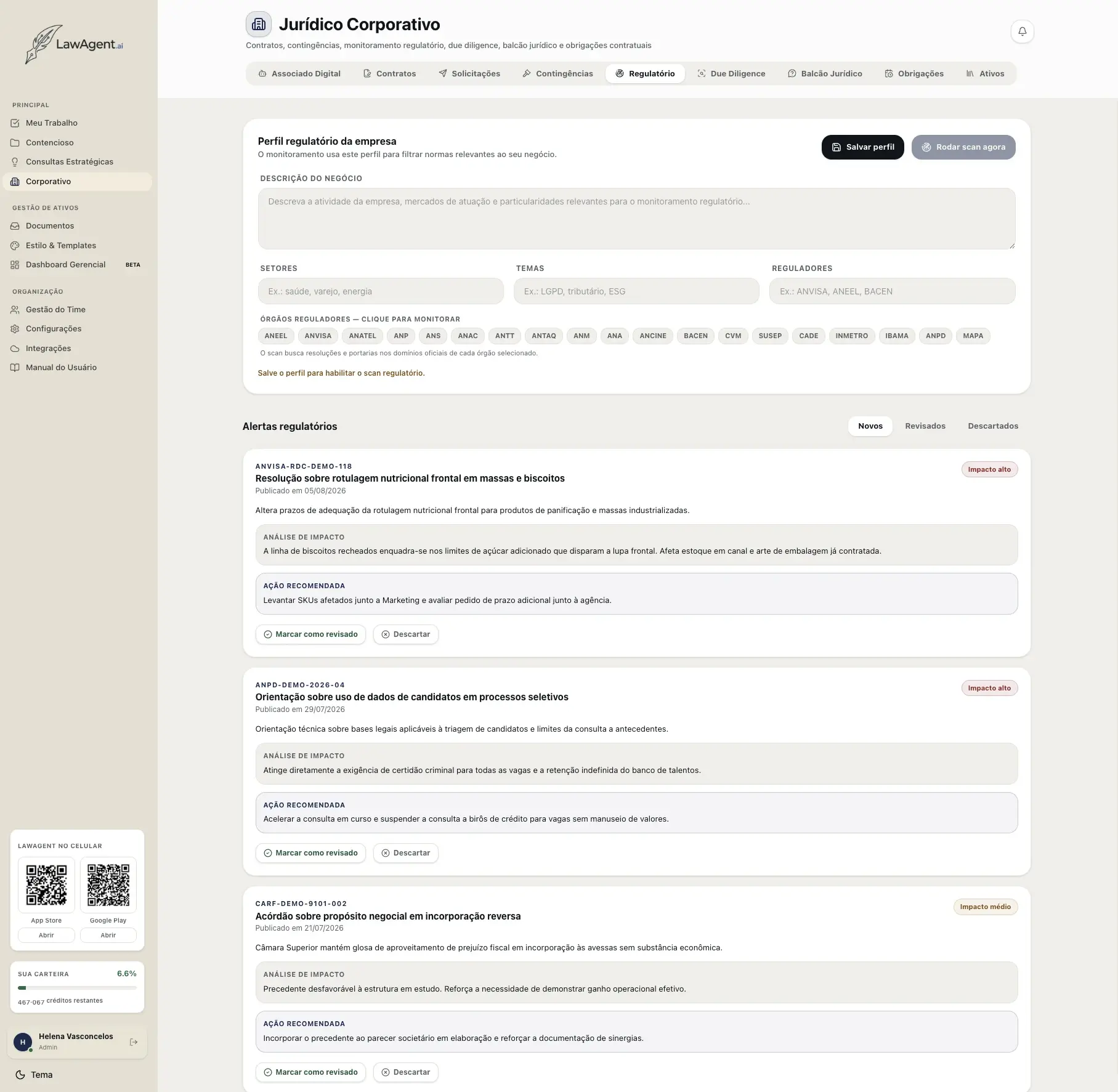
Regulatory profile and alerts
The company's profile and monitored agencies on one side; on the other, alerts classified by impact, each with an analysis of the effect on operations and the recommended action.
Due Diligence
The entire data room read, with red flags on the table
In an acquisition, the user creates the project, uploads the deal's documents to the data room, and has the AI analyze them. The result is the list of red flags classified by severity and by area — environmental, corporate, contracts, tax, labor — and each finding comes with the exact excerpt from the document that generated it and the read on what it means for the transaction: risk of a shutdown order, early debt maturity triggered by a change of control, a tag-along clause that raises the payout, an under-provisioned liability. It's what turns hundreds of pages of data room into a negotiation agenda and into conditions precedent for closing.
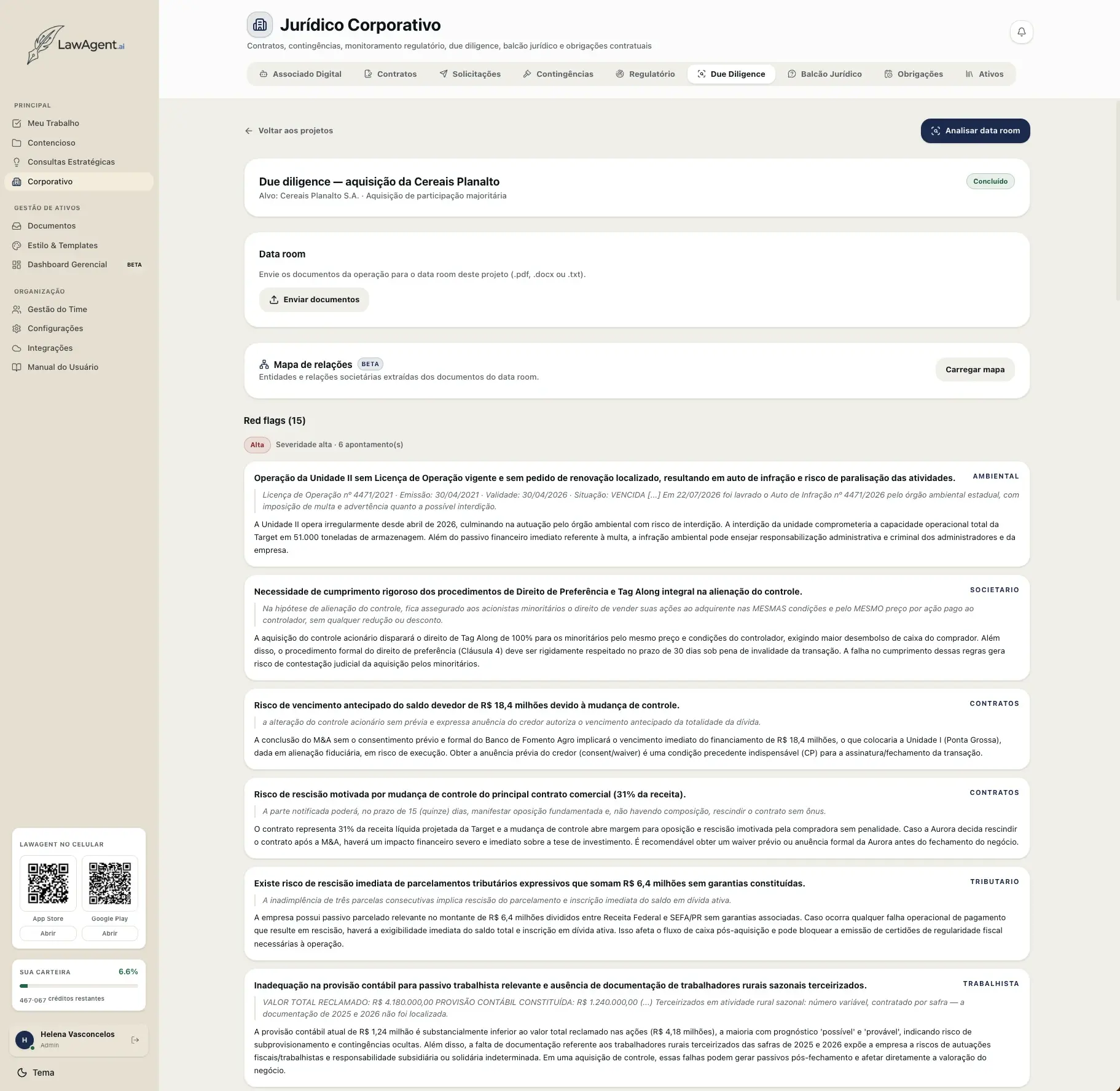
Red flags from the data room
Each finding with its source excerpt, the area, and the read on the impact to the operation — plus the corporate structure map extracted from the documents.
Legal Help Desk
Everyday questions, answered by house policy
The Legal Help Desk is the entry point for the quick questions that today reach legal by message and eat up the team's time: “can I accept a gift from a supplier worth more than R$ 100?”, “what's the approval authority for service contracts?” The answer is based on the company's own internal policies — not on generic law. It's a single question, not a persistent chat: each inquiry is answered and closed, which keeps the channel focused and frees up the team for the work that truly requires a lawyer.
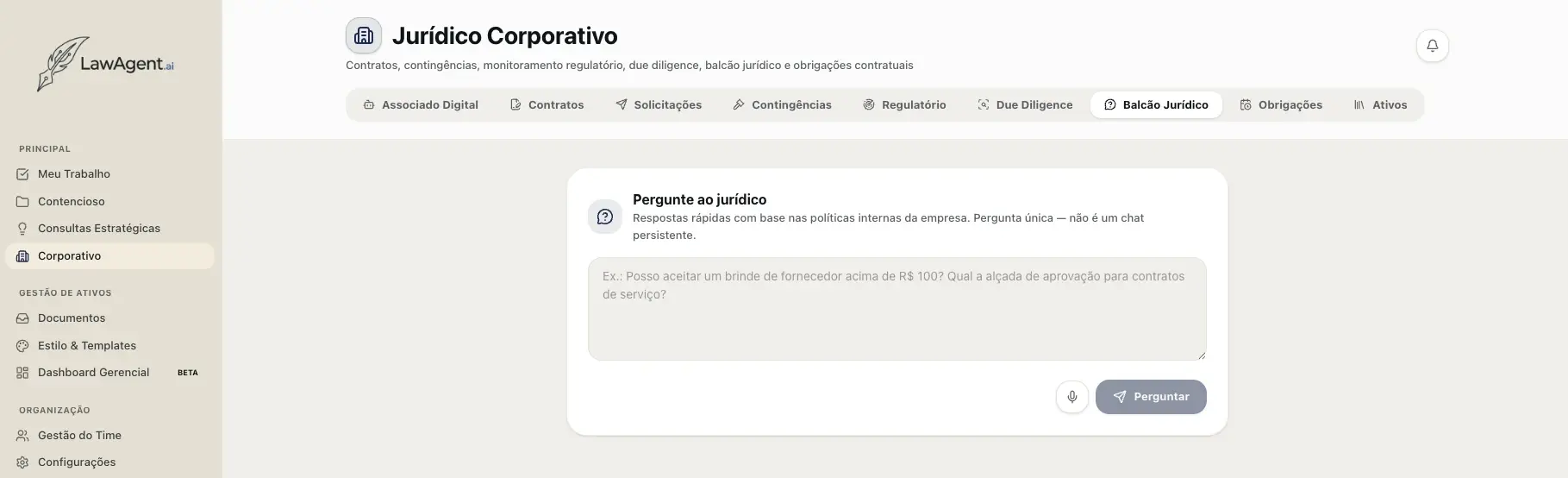
Ask legal
Quick answers anchored in the company's internal policies — a single question, without turning into an endless chat.
Obligations
What the contract requires, extracted and monitored
Once the contract is signed, what remains is complying with what it requires — and that's where deadlines get lost. Obligations extract every commitment from the contract and organize them into two lists: upcoming obligations, with type, owner, date, and recurrence within a defined horizon; and undated triggers, which are obligations conditioned on events — a penalty for delays beyond five business days, a report due within 72 hours of receipt, notice of a change of control 30 days in advance, automatic renewal unless terminated with 90 days' notice. Each item shows the trigger that fires it and the owner, and is completed or dismissed directly from the list.
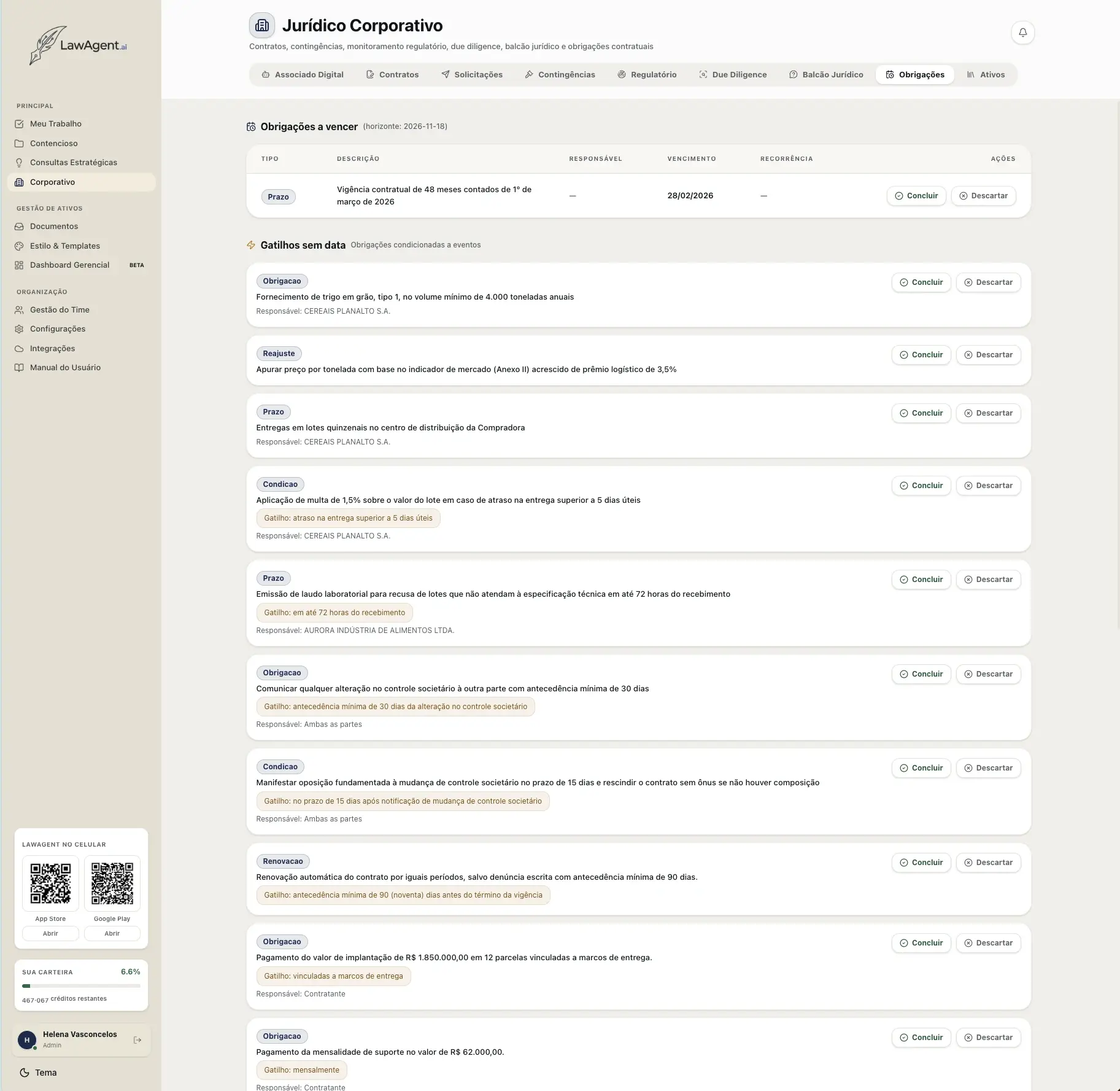
Contractual obligations and triggers
Deadlines, adjustments, conditions, and renewals extracted from the contract — with the trigger that fires each one and the person responsible for compliance.
Fifth step
Management and governance
On the administrator's side, the Management Dashboard answers the questions that underpin the decision to keep investing: who is using the platform, how effectively, at what cost — and under which AI model the organization wants to operate.
AI Audit
Who uses it, how much, and for what
The audit shows the platform's real usage by type of work — chat, document generation, strategic analysis, brief review, corporate — with the trend over the period and a breakdown by user. Alongside it, credit consumption: total for the period, top consumer, the share of each type of service, and the outlier service in cost per operation. It's what separates real adoption from an idle license, and shows where spending is concentrated before it becomes a surprise at the end of the month.
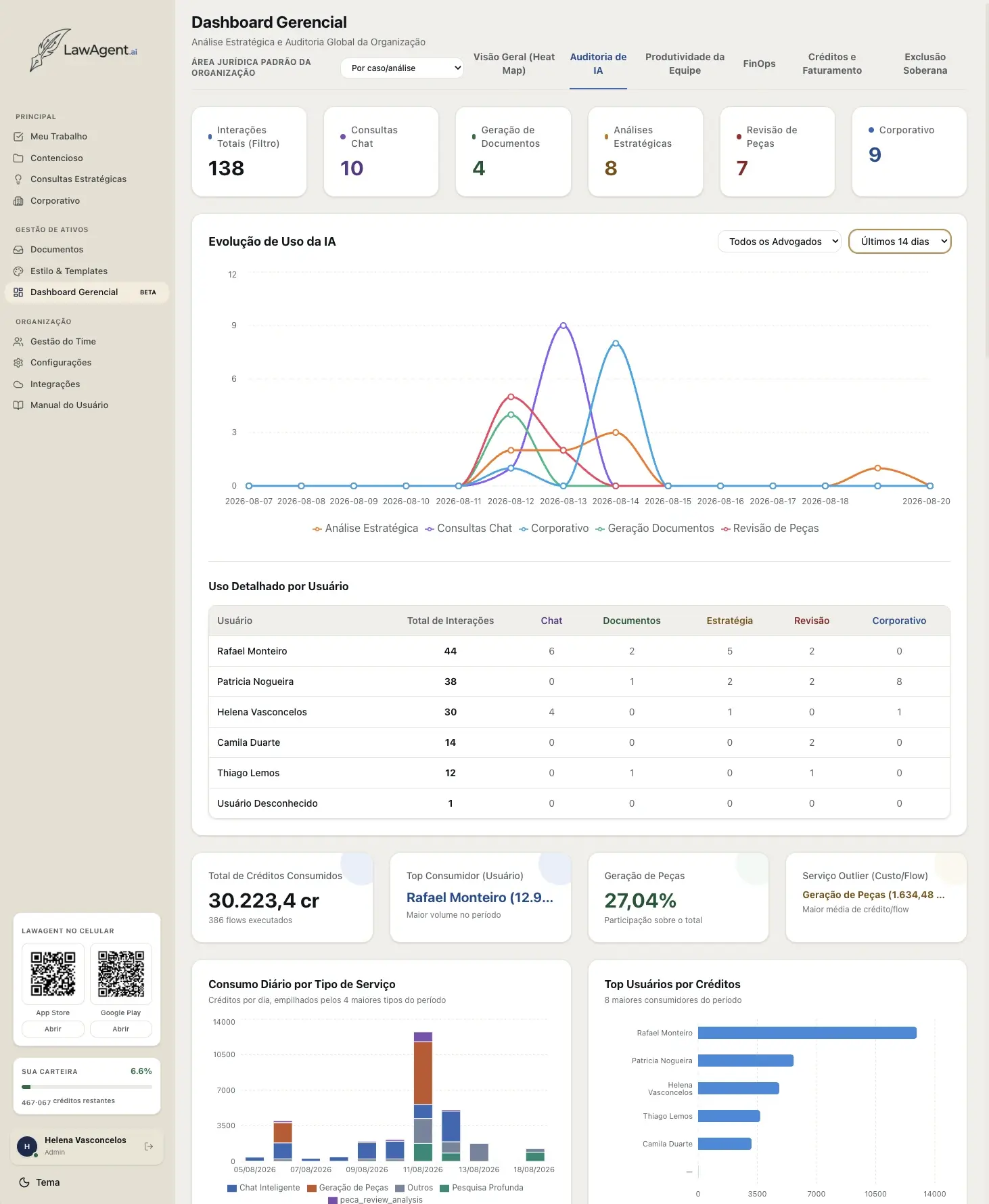
AI Audit
Usage by type of work and by user, trend over the period, and credit consumption — with the service with the highest average cost highlighted.
Team productivity
Workload, effectiveness, and rework
Here the administrator sees the human side of the operation: completed and overdue tasks, execution and approval time, rework percentage, and the effectiveness index per person. The workload chart combines responsibility, allocation, open tasks, and value under responsibility — each component measured against the organization's average — and flags who is overloaded and who has slack. The platform itself puts the caveat on screen: a high index isn't a verdict, it's an invitation to talk before reallocating. An AI executive summary can be generated on demand from these numbers.
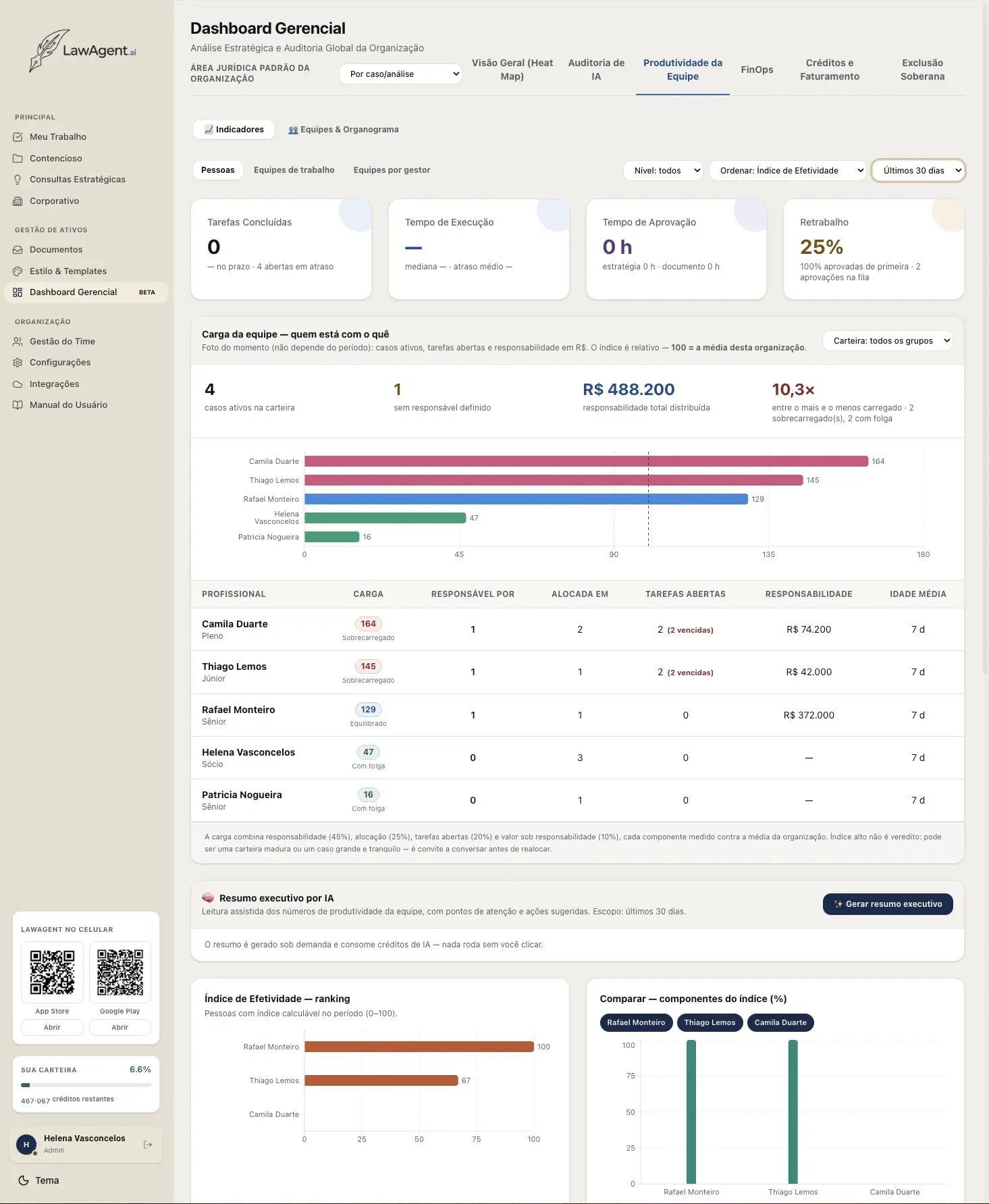
Team productivity
Workload per professional against the organization's average, effectiveness index, and rework — with an AI executive summary on demand.
FinOps
The portfolio by results, not by volume
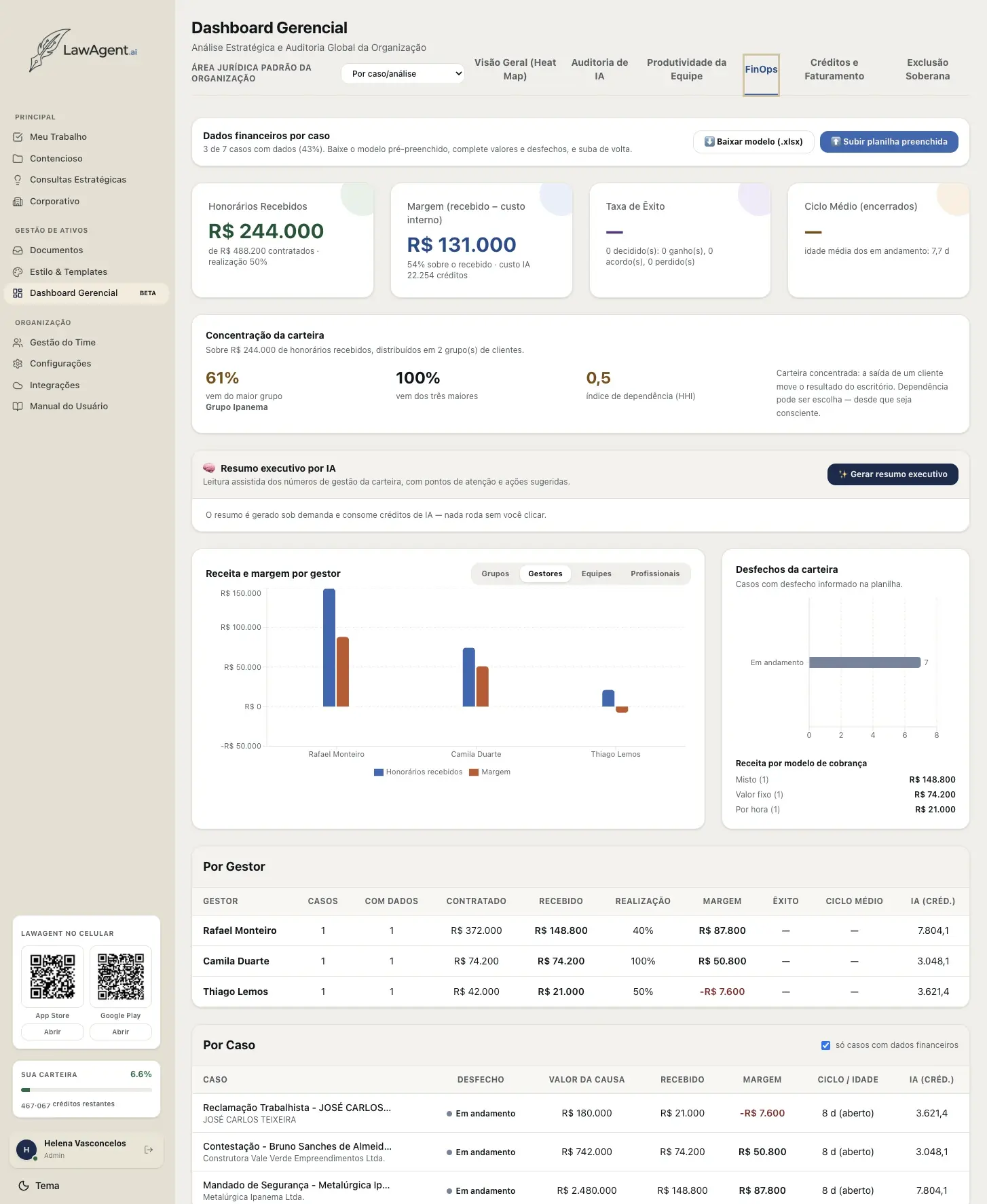
FinOps cross-references the case's financial data with the AI cost consumed on it: fees contracted versus received, margin, success rate, and average cycle time. Portfolio concentration is shown explicitly — how much comes from the largest client, how much from the top three, and the dependency index — with the reading that dependency can be a choice, as long as it's a conscious one. Below that, revenue and margin by manager, team, or professional, and the case-by-case breakdown with the AI credits spent on each one. It's the objective answer to “does the platform pay for itself?”
FinOps
Fees, margin, and cycle time by case and by manager, portfolio concentration, and the AI cost consumed on each case.
AI Models
The organization chooses the model — or lets the user choose
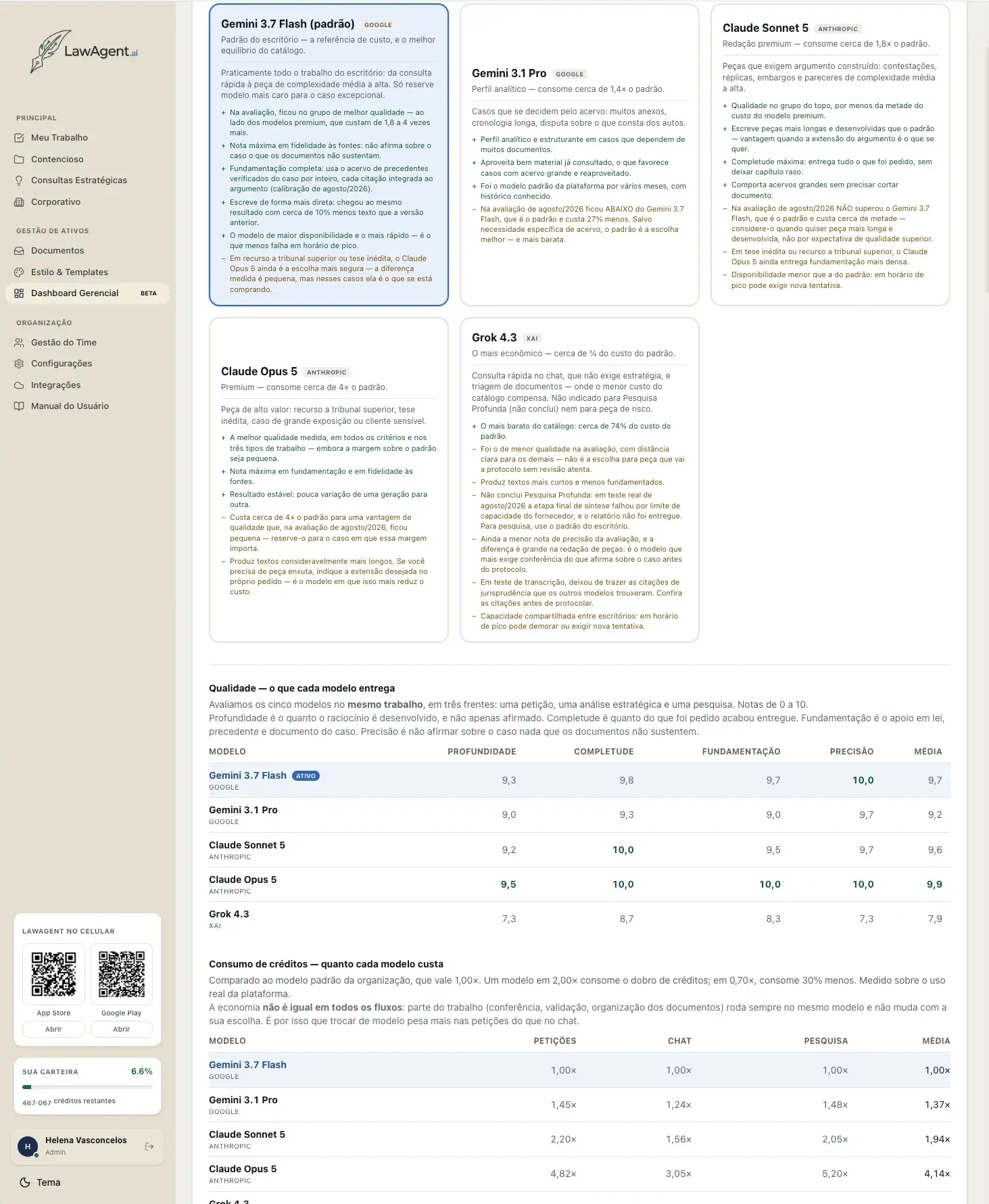
The administrator sets which LLM is the company's default, or lets each user choose the model for every interaction. The choice is informed, not blind: the platform publishes an evaluation of the available models — Gemini 3.7 Flash, Gemini 3.1 Pro, Claude Sonnet 5, Claude Opus 5, and Grok 4.3 — compared on the same task for depth, completeness, grounding, and accuracy, along with the relative cost of each one for briefs, chat, and research. Each model comes with a usage recommendation and explicit caveats, including cases where the most expensive one isn't worth it. And there's an honest note on savings: part of the work — checking, validation, organizing documents — always runs on the same model, so switching models matters more for drafting briefs than for chat.
Model catalog and evaluation
Each model with a usage recommendation, caveats, and a score per criterion — plus the cost relative to the organization's default for briefs, chat, and research.
See the rest of the day in a demo.
We'll walk through the rest of the flow — research, drafting, review, and delivery — with a real case from your firm.